

Looking for a smart fan or heater from Xiaomi and don't know where to start? It's normal to feel overwhelmed : there are towers that heat, towers that only ventilate, and very similar-sounding names. Here we clarify the differences between the Xiaomi Fan Heater Compact, the Xiaomi Mi Heater Tower Lite (also called the Xiaomi Smart Tower Heater Lite), and the Xiaomi Smart Tower Fan 2, with everything you need to know about app control, modes, security, timer, and voice assistance.
Throughout this article, we'll include practical tips and official clarifications, such as the fact that the tower heater's Natural mode doesn't replace a fan, and that the timer can be set both on the device itself and via the app. We'll also explain why Xiaomi's terminology can be confusing and how it aligns with actual user demand: battery capacity, dock-style charging base, and compatibility with Google Assistant or Alexa.
What each model is and how they differ


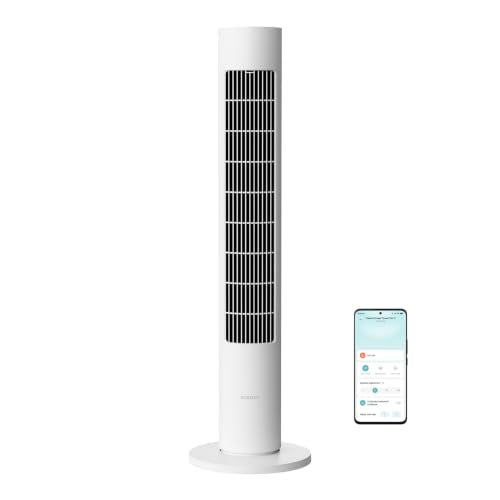
Let's start by identifying each option. The Xiaomi Fan Heater Compact , as its name suggests, is a compact heater designed to quickly warm small rooms. The Xiaomi Mi Heater Tower Lite (Xiaomi Smart Tower Heater Lite) is a tower heater with smart features and operating modes. The Xiaomi Smart Tower Fan 2, on the other hand, is a tower fan that circulates air to cool, without heating.
This distinction is key: two are heaters (Fan Heater Compact and Mi Heater Tower Lite) and one is a fan (Smart Tower Fan 2). If your priority is combating the cold, you should look at the heaters; if you want cool air, the tower fan is the way to go. Among the heaters, the Smart Tower Heater Lite stands out for its very fast heating and intelligent thermal management, as well as its options in the Mi Home/Xiaomi Home app.
Xiaomi itself highlights several features of its tower heater: it can provide heat in just a few seconds, offers a wide 70° oscillation to distribute airflow, features constant temperature control, and provides four preset modes. These characteristics make it very versatile for everyday use.
It's worth noting an official distinction: the Xiaomi Smart Tower Heater Lite's Natural mode isn't a complete replacement for an electric fan. It provides a gentle breeze , but if you're looking for real cooling during the summer, the appropriate device is a tower fan (Smart Tower Fan 2). This will help you avoid disappointment by avoiding features that don't correspond to each category.

Xiaomi Smart Tower Heater Lite, the tower heater in detail
The Xiaomi Smart Tower Heater Lite combines a column design with intelligent control, all with one clear objective: instant comfort . It achieves this by heating up in just 3 seconds thanks to its ceramic element and managing the temperature to avoid overheating or underheating. The result is a room that heats up quickly and maintains a comfortable temperature.
It features an oscillation of up to 70°, which helps distribute warm air more evenly throughout the room. This lateral sweep reduces cold spots and creates a more uniform environment. In cold climates or large rooms, this feature makes a significant difference compared to units that only blow air in a straight line.
The unit offers four different modes to suit every situation: a constant temperature mode (the system adjusts the power to maintain comfort), a high heat mode, a more moderate heat mode, and a Natural mode with a gentle breeze. Additional modes and fine-tuning options not available on the physical panel can be found via the Mi Home/Xiaomi Home app .
The timer is very well designed: you can program 0/1/2/4/8 hours directly on the device, while the app allows you to set more flexible periods up to a maximum of 8 hours. This lets you sleep soundly knowing the device will turn off at the desired time, or prepare rooms for when you get home.
In terms of safety, the brand details several protections: automatic shut-off if the unit is tilted or tipped over, overheat protection, a child lock, and a brief cooling cycle upon shutdown to protect its components. An important note : the tip-over switch may make a noise if the heater is moved or shaken; this is normal and not a problem.

Connectivity, app and voice control: what you need to know
The Xiaomi ecosystem truly shines when you take full advantage of the Mi Home/Xiaomi Home app. With the Smart Tower Heater Lite, you can turn the unit on or off, change modes, schedule timers, and even adjust the temperature from your phone or use your Android device as a remote control . This is ideal when you want to come home to a comfortable temperature or if you need to manage multiple devices in different rooms.
In terms of voice control, it's compatible with assistants like Alexa and Google Assistant, with Xiaomi's official clarification: these voice control functions only work when used with devices capable of smart voice control, and the necessary equipment for that connection is sold separately. In other words, you'll need a compatible speaker or hub to give voice commands to your heater or fan.
A real-world example illustrates the confusion surrounding the product catalog: users have cited in forums the difficulty in understanding which model to buy among options like Mi Smart Standing Fan 1X, Smartmi Standing Fan 2S, Smartmi Standing Fan 2, Smartmi Standing Fan 3, Mi Smart Standing Fan 2, Mi Smart Standing Fan Pro, Mi Smart Standing Fan 1C, and another variant without a clear name that was listed on AliExpress with a 7+5 blade rotor. Those looking for an integrated battery, a docking station, and Google Assistant control often encounter incomplete specifications or a mix of product names.
Why all the confusion? Xiaomi and its partner brands frequently publish reviews with similar-sounding names (Lite, Pro, 1C, 1X, 2, 2S, 3…), and sometimes distributor product listings don't clearly differentiate between versions. My practical advice is to always check three things: whether the model heats or only fans, whether it explicitly states compatibility with Mi Home/Xiaomi Home (not just a generic "app"), and whether Alexa/Google support is specified along with a note about additional requirements.
The Smart Tower Fan 2's purpose is clear: it's a tower fan designed to move air with a stable and quiet flow. It doesn't generate heat , so it complements a heater perfectly in winter (for air distribution) and becomes the star when temperatures rise. By combining a tower fan with a heater, you can switch between them depending on the season.

Modes, timer, and important nuances that define the experience
The tower heater's four modes cover typical needs: high power when you arrive home cold, moderate heat for a comfortable temperature, constant temperature when you want the unit to manage it automatically, and a Natural mode that simulates a breeze. This last mode is gentle and not intended to replace the airflow of a dedicated fan.
The timer offers a combination of simplicity and flexibility: on the device itself you can choose between five options (0/1/2/4/8 hours), while in the app you can set any period within the 8-hour limit. It's perfect for avoiding forgetfulness and for creating personalized routines, for example, a short start time first thing in the morning or a gradual shutdown at night.
There are a few details worth knowing before buying, which Xiaomi openly documents: the anti-tip switch may make a slight noise if you move or shake the device, which is normal; voice functions require compatible devices purchased separately; and the Mi Home/Xiaomi Home app offers additional temperature settings beyond those available directly on the device itself. All of these points help you avoid surprises and get the most out of your device from the very first use.
Another practical feature is the 70° oscillation, which not only improves the distribution of warm air but also allows for better direction of the airflow towards the occupied area. In living rooms and bedrooms, a medium oscillation is usually sufficient, while in larger spaces, the full horizontal sweep is appreciated.
Regarding acoustic comfort, the official statement emphasizes its discreet operation, with less noise than usual for a device of this type. This is key at night or while working from home, when you need warmth but without a constant, annoying hum. The cooling cycle upon shutdown helps extend the unit's lifespan and safely dissipate residual heat.


Table of Contents