

AccuWeather is one of the most popular weather apps on the Google Play Store, used by millions of users worldwide to check weather forecasts reliably, quickly, and in a visually appealing way. It has traditionally stood out for its accuracy, variety of features, and meteorological reliability, but like any leading app, it has evolved to stay ahead of the curve. This evolution has been marked by adapting to trends in design and user experience, especially after incorporating Google's Material Design standard , resulting in a modern, intuitive interface that meets the current expectations of Android users.
AccuWeather Redesign: Material Design Adaptation and Updated Features

For years, AccuWeather used the Holo interface , a feature of Android 4, which became outdated compared to newer visual and usability standards. With its transition to Material Design , the app underwent a radical visual transformation: menus, transitions, and main sections were simplified and organized, making it easier to access essential weather information without distractions. This transformation not only improved the aesthetics but also significantly enhanced the user experience, allowing for smoother and more natural navigation, better suited to the needs of most users who require quick reference.
The new design features flat colors, redesigned icons, and smooth transitions . The entire visual aspect has been revamped with the aim of providing clear information, avoiding data overload, and allowing any user, even those with limited experience, to access the weather forecast quickly and easily. It's worth noting that in more recent versions, AccuWeather's visual appearance has continued to evolve, implementing dark modes and themes that change depending on the time of day or weather conditions, providing an even more immersive experience in line with current mobile design trends.

With the redesign, the app restructured its internal organization, adopting a tab system that facilitates quick access to the different sections:
- Today (formerly "Now"): shows in a summarized and visual way the most relevant weather information for the current moment and hyperlocal prediction for the next few minutes.
- Hourly: Details by time slot of temperature, precipitation, winds and expected conditions, ideal for planning activities throughout the day.
- Diary: Extended view of the forecast over several days, allowing you to see trends and possible important changes.
- Maps: Access to various interactive maps, radars, and regional and global visualizations of weather conditions.
- Institutional: Integration of weather news and informative videos about the weather, although it should be noted that, in the initial versions of the redesign, the "News" tab was removed.
The new side navigation panel centralizes saved locations, making it easy to switch between cities or regions of interest with a single tap. Furthermore, layout customization has been enhanced, allowing users to choose which three key data points they want to display on the main current conditions cards. Available options include humidity, UV index, wind speed, cloud cover, dew point, atmospheric pressure, and visibility, providing control and adaptability to individual preferences.
Advanced Features: Minutecast, Radar, and Real-Time Alerts
One of AccuWeather's key differentiators from other weather apps is the variety and sophistication of its advanced features . The following are particularly noteworthy:
- Minutecast®: An innovative minute-by-minute forecast feature that provides alerts about impending precipitation changes in the user's exact area. It's ideal for anticipating unexpected downpours or knowing if there's a risk of an impending storm while engaging in an outdoor activity.
- Live weather radarInteractive maps that allow you to see in real time how cloud masses, storms, cold fronts, and rain are moving, both locally and regionally. This feature has been optimized with the new design, also integrating satellite imagery and various visual layers to quickly identify areas at risk from weather.
- WinterCast™: This specialized winter forecasting system offers advanced warnings about probability and accumulation of snow, which is very useful in areas where snowfall can affect mobility or daily planning.
- Personalized Severe Weather Alerts: Keeps users informed when adverse conditions such as thunderstorms, heavy rain, strong winds, heat waves, extreme cold, poor air quality conditions, and other notable phenomena are detected.
The integration of these functionalities makes AccuWeather not only an informative tool, but also a preventative one , helping users to anticipate weather phenomena and make informed decisions in daily activities or trips.
Customizing and configuring weather information
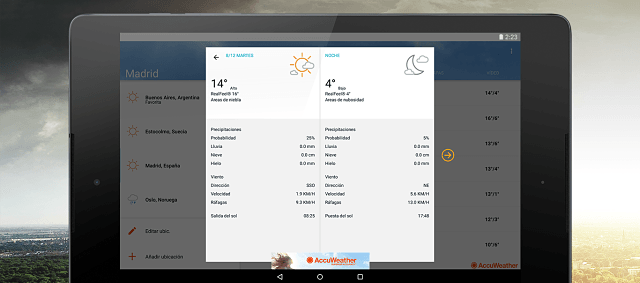
One of the main complaints from more advanced users after the redesign was the reduction in the information displayed by default . Previously, AccuWeather offered a wealth of detail on each screen and advanced options such as dynamic temperature and precipitation graphs, as well as various desktop widgets. However, this simplification responded to a general demand for accessibility and speed, since most users prioritize quickly knowing whether they can go out without an umbrella or what clothes to wear the next day. Even so, the application retains the ability to delve deeper into the forecast by selecting each section or using the expanded details section.
Regarding personalization , users can choose their preferred weather data and rearrange the order in which it appears, allowing them to tailor the experience to their needs. This includes those who simply want to know if it will rain soon or those seeking a more in-depth analysis of weekly trends in temperature, wind, humidity, atmospheric pressure, or storm probability. This flexibility is crucial for those who live in areas with changeable weather or travel frequently.
Widgets and Home Screen Display
AccuWeather's redesign included significant changes to the available widgets . While there were initially four customizable widgets, only one main widget remains in recent versions. Those who used widgets for shortcuts to temperature trends, hourly precipitation graphs, or advanced information noticed their absence, sparking debate within the user community. However, the general trend in mobile design is toward simplification and energy efficiency, prioritizing compact, visually appealing, and easily readable widgets.
The current AccuWeather widget focuses on displaying essential information (current temperature, sky conditions, probability of rain, and important alerts) and features integration to adapt to light and dark modes depending on the device's settings. While some of the removed features may return in improved versions in future updates, AccuWeather still allows for quick access directly from the home screen, something especially valued by those who want to check the weather simply by unlocking their phone.

Exclusive AccuWeather Features and Superior Accuracy
AccuWeather has been awarded and recognized internationally by institutions such as the World Meteorological Organization thanks to its user interface, accuracy in the data represented, advanced alert system and focus on the visual presentation of information.
- Minute-by-minute weather forecasts, unique and customizable according to the current location.
- Hyperlocal predictions, which provide exact details for specific neighborhoods or areas in large cities.
- RealFeel® & RealFeel Shade Temperature™ Technology, which provides a real thermal sensation taking into account humidity, wind and other parameters, not just the objective temperature.
- Broad cross-platform compatibilityIn addition to Android, AccuWeather is available on tablets, TVs, smartwatches with Wear OS, and other connected devices.
- Long term forecast: The ability to view forecasts for up to 45 days in advance, something unusual in other apps and very useful for planning vacations or special activities.
- Information on air quality, UV index, allergy alerts and other environmental health elements, anticipating the current demand for urban and rural environmental monitoring.
Customization Options: Light, Dark, and Responsive Themes
AccuWeather includes several display modes that adapt to the user's environment or preferences:
- Traditional light and blue mode, optimal for daytime readability.
- Dark mode, which helps reduce eye strain and power consumption, especially on OLED displays.
- Pure black mode, recommended to maximize energy savings on devices with AMOLED and OLED displays, automatically adapting according to system settings.
This ability to customize the appearance responds to the current trend of customization and accessibility, where each user can adjust the appearance of the application to their tastes or needs during the day and night.
Removing tabs and sections: community reaction and solutions
The transition to a minimalist interface was not without its critics. Experienced users pointed out the disappearance of the news tab and the advanced temperature, wind chill, and rainfall graphs as negative aspects . The reduction in widgets was also a point of contention, as many advanced users missed the depth and variety of information available in previous versions.
However, AccuWeather has proven responsive to its community's feedback, making adjustments and continuous improvements with each update. While the simplification focused on improving search speed and reducing visual clutter, several removed features have been returning in adapted versions, and there is an expectation that widgets, interactive charts, and news will continue to evolve to cater to both casual and expert users.
Advertising, business model and premium options
AccuWeather is free to download and includes ads to fund the provision of high-quality weather data to millions of users worldwide. The advertising is discreetly integrated into the app, although some early versions placed ads in the center of the screen, which was not well-received by frequent users.
For those seeking a completely ad-free experience and some additional features, there is the option to subscribe to the Premium service , which removes banners and offers priority support, as well as early updates on certain platforms.

Compatibility and Availability: Devices, Systems, and Updates
AccuWeather is available on the Google Play Store for Android phones and tablets, and can also be installed on compatible TVs, Wear OS devices (smartwatches), and other connected accessories. The app adapts perfectly to the size and resolution of each screen, ensuring an optimal experience on everything from compact smartphones to large tablets and TV displays.
App updates are frequent, introducing security and performance improvements, new features, and adjustments based on community feedback and technological advancements. Furthermore, backward compatibility with previous Android versions is ensured, allowing its use on a wide range of devices, including those with older operating system versions.
Comparison with other weather apps: AccuWeather's strengths
Compared to competitors like Google Weather , Weather Timeline, Breezy Weather, or Xiaomi's app, AccuWeather stands out because:
- Global coverage and hyperlocal precision, with very short-term forecasts and exclusive systems like Minutecast.
- Extensive customization options in the display and selection of meteorological parameters.
- International recognitions for visual presentation and ease of use, awarded by specialized institutions.
- Cross-platform compatibility and continuous updates, which ensures its validity in the face of technological changes.
- Integrated alerts and access to weather news breaking news, making it an information and prevention tool for extreme events.
Other apps may stand out for specific details, such as adaptive dynamic display (Xiaomi), full integration with the Google ecosystem, or being open source (Breezy Weather), but the balance between accuracy, design, customization, and variety of functions continues to place AccuWeather as one of the preferred options for users and mobile meteorology experts.
User reviews and ratings on Google Play
AccuWeather boasts one of the largest and most active user communities in the weather app segment. On the Google Play Store , the app has over 50 million installs and more than 1,4 million reviews, with an average rating of 4,3 out of 5 stars. These figures attest to the widespread trust and satisfaction of its users, who highlight the following key strengths:
- Ease of use and speed of consultation of the forecast.
- Reliability and precision in forecasts, both general and hyperlocal.
- Constant updates that improve the experience without losing the essence of the app.
- Reliable alerts and relevant notifications on adverse phenomena.
- Graphic quality and attractive design, appreciated on mobile devices as well as tablets and wearables.
Negative comments generally refer to the removal of advanced features or widgets in the process of simplifying the interface, as well as the presence of ads in the free version. However, the AccuWeather team usually responds and gathers feedback for future improvements.
How-to Guide: How to Download and Install AccuWeather for Android
If you want to take advantage of all the benefits and see for yourself how AccuWeather has evolved since the Material Design update, you can download the latest version of the Android app by going directly to the official app store:
The installation process is quick and easy, and once you open the app, you can configure your favorite locations, activate alerts based on your interests, and customize the display of the weather information that interests you most.
AccuWeather FAQs and Usage Recommendations
- Does AccuWeather consume a lot of data or battery? The app is optimized to minimize resource consumption, using geolocation only when necessary and allowing manual or automatic updates based on preference. Dark modes and tricks like updating over Wi-Fi also help reduce power and mobile data consumption.
- What are the differences between the free and premium versions? The main difference is the removal of ads and the inclusion of priority support in the Premium version. Basic weather forecasting, alerts, and maps features are available to all users.
- Can AccuWeather be accessed from other devices? Yes, the app is compatible with tablets, Wear OS wearables, and select smart TVs, expanding its use across the Android ecosystem.
- Is AccuWeather suitable for professionals? Although the app is aimed at the general public, the large number of customizable parameters and the accuracy of the forecasts make it also useful for professionals in transportation, tourism, agriculture, and outdoor activities.

AccuWeather remains one of the most highly rated, reliable, and comprehensive weather apps in the Android ecosystem. With its definitive adoption of Material Design, the app has modernized and improved both in appearance and usability, offering an experience tailored to the current demands of mobile users. Despite some criticism for the elimination of advanced features and the simplification of certain sections, the balance between ease of use, accuracy, customization, and visual design continues to place it at the top of the available options. If you need a benchmark weather forecasting tool with hyperlocal alerts and a pleasant and functional visual environment, AccuWeather is undoubtedly a safe bet for your daily work. Don't hesitate to share your impressions of the latest changes and improvements in the comments section at the bottom of this article. Your feedback always contributes to the evolution of the apps in the most useful and convenient direction for all users.
Table of Contents
- 1 AccuWeather Redesign: Material Design Adaptation and Updated Features
- 2 Navigation and structure: panels, tabs, and customization
- 3 Advanced Features: Minutecast, Radar, and Real-Time Alerts
- 4 Customizing and configuring weather information
- 5 Widgets and Home Screen Display
- 6 Exclusive AccuWeather Features and Superior Accuracy
- 7 Customization Options: Light, Dark, and Responsive Themes
- 8 Removing tabs and sections: community reaction and solutions
- 9 Advertising, business model and premium options
- 10 Compatibility and Availability: Devices, Systems, and Updates
- 11 Comparison with other weather apps: AccuWeather's strengths
- 12 User reviews and ratings on Google Play
- 13 How-to Guide: How to Download and Install AccuWeather for Android
- 14 AccuWeather FAQs and Usage Recommendations