

Android 5 Lollipop has been constantly in the news due to its release, evolution, and subsequent updates aimed at improving user experience , performance, and security on Android phones and tablets. While many models in Spain and the rest of the world have already received their first doses of Lollipop through versions like Android 5.0.2, the arrival of Android 5.1 Lollipop has marked a turning point and generated considerable excitement among both users and manufacturers.
The Android universe is constantly evolving. New versions of the operating system , devices with technical innovations, and continuous updates shape the daily life of a platform that seeks to maintain its leadership. With this comprehensive guide, we break down everything you need to know about Android 5.1 , the updates for Android 5.0.2 , its essential new features, detailed improvements over previous versions, bug fixes, and the most complete list of compatible devices.
Introduction to Android Lollipop: Material Design and first new features

Android Lollipop represented a major leap forward for Google's mobile operating system, characterized primarily by the introduction of the Material Design language , which completely changed the interface and visual experience compared to previous Holo-based versions. This resulted in a more modern, colorful, intuitive, and fluid look, with animations reaching up to 60 fps, providing a minimalist yet powerful environment in terms of usability.
Among the first new features were smart notifications , accessible from the lock screen; the ability to reply to messages or view alerts without unlocking the device; and a sophisticated priority system for choosing which apps or contacts can interrupt you, even setting do-not-disturb times. Multi-user mode also debuted, especially useful for tablets and phones shared by several family members, as well as a guest mode for greater privacy.
Lollipop brought crucial fundamental changes: the replacement of Dalvik with Android Runtime (ART) significantly improved performance, reduced latency, and optimized application execution. Project Volta was incorporated to save battery life, improving autonomy through a new power-saving mode, better diagnostic tools, and intelligent management of background processes.
Android 5.0.2 Updates: Devices, Tips, and Downloads

Following the release of Android 5.0 Lollipop, some issues detected in performance, memory management, and battery life led to minor updates such as version 5.0.2. This version, distributed primarily through OTA (Over The Air) updates, focused on fixing bugs and optimizing the user experience, reaching flagship devices like the Nexus 7 (WiFi/3G/LTE) , Nexus 10, Nexus 9, and selected models from other brands.
- Nexus 7 (2012 and 2013), Nexus 10 and Nexus 9: The update to 5.0.2 was rolled out gradually, specifically to address specific issues with battery management and system stability on these models.
- Moto G 2014: It was one of the first in Spain to officially receive the update, offering notable improvements in fluidity and lower energy consumption.
- Downloading updates is always recommended on a WiFi network stable, since the files can take up several hundred megabytes and thus avoid excessive consumption of the mobile data rate.
To check if your device has a system update available , simply go to Settings → About phone/tablet → System updates and force a search. If the OTA notification doesn't appear immediately, it's usually available within the following days or weeks, depending on the manufacturer and carrier.

Moto G, Moto E, and Motorola's update policy
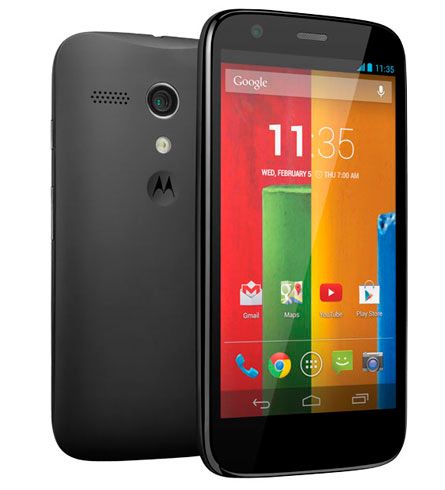
Motorola established itself as one of the manufacturers that most quickly adopted and distributed new versions of Android on its devices. The Moto G (2014) and later models received Android 5.0.2 in the first waves of its rollout in Spain, setting the standard for support and speed of updates outside the Nexus ecosystem.
- To update, the Moto G would send out an automatic notification when the new version was ready. You could also check manually at Settings → About phone → System updates.
- El Moto E, although somewhat late compared to the Moto G, was also included in the update roadmap, receiving Android 5.0 Lollipop and subsequent minor updates, allowing a wider segment of users to access the new features of Lollipop.
- Important tip: before starting any update, you should have at least 50% battery life and a backup of your most important data to avoid losses due to unexpected process failures.
Android 5.1 Lollipop: Evolution, New Features, and Troubleshooting

Android 5.1 Lollipop brought many improvements and fixes that resolved persistent issues from previous versions. This update not only added support for new devices but also improved stability, security, and connectivity on smartphones and tablets compatible with this version.
It officially debuted on the Android One range, especially in Asian countries with low-cost devices, and was later implemented on Nexus models and other flagship devices. Logically, minor revisions like 5.0.3 or 5.0.4 were expected, but Google opted for a major update, leaving these patches behind and jumping directly to 5.1.
Key new features in Android 5.1 Lollipop include:
- Restoring Silent Mode: Following the controversial disappearance of absolute silence mode in Android 5.0, Google reintroduced an improved version of the notification priority and management system. It now allowed users to configure time periods (for example, until the next alarm) and display separate icons for each status (All, Priority, Nothing).
- Quick Settings Improvements: The quick settings menu has been expanded to allow direct selection of Wi-Fi networks and Bluetooth devices from the top bar. This saved time and simplified connection management while on the go.
- Performance optimization and bug fixes: One of the focuses of Android 5.1 was RAM management and a solution to unexpected app crashes, a recurring issue in the first version of Lollipop. A slight improvement was observed on devices like the Nexus 5 and Nexus 7, improving the overall experience.
- Managing floating notifications: It is now possible to hide floating notifications (Heads-Up) without removing them from the main panel, making it easier to access them later without losing them.
- Multi-SIM and call improvements: Dual SIM devices were able to assign colors to each SIM and manage calls and messages more visually, very useful in emerging markets and compatible models.
- Animations and Material Design: Animations have been added to the clock app, Google Now, Bluetooth icons, and other elements, further enhancing the distinctive Lollipop look.
- Security enhancements: Features such as Factory Reset Protection (FRP), automatic data encryption, and SELinux improvements have been implemented, increasing protection against malware and unauthorized access.
- Smart Lock: Unlocking could be linked to trusted devices (smartwatches, NFC tags, locations), facilitating secure access without sacrificing privacy.
- Battery saving improvements: Thanks to Project Volta and new task scheduling options, consumption was optimized, providing greater autonomy, especially in energy-saving mode.
- Advanced audio and multimedia support: lower input latency, multi-channel support, and compatibility with new graphics and imaging standards, including RAW photography.
- Improved multi-user mode: Smartphone support has been strengthened, facilitating user and guest management, especially useful in family or work environments.

The impact of these features has resulted in a clear improvement over Android 5.0.2, not only in stability and performance, but also in a more personalized and secure user experience.
Devices updated to Android 5.1 Lollipop: complete lists by manufacturer

The Android 5.1 update policy varied depending on the manufacturer and device lineup. Below is a list of the main devices that have received the update, either officially or through Google Play Edition, Android One, or confirmed alternative ROMs:
Google Nexus, Google Play Edition and Android One
- Google Nexus 9
- Google Nexus 7 (2012 and 2013)
- Google Nexus 6
- Google Nexus 5
- Google Nexus 10
- Google Nexus 4
- Android One devices such as Evercoss One X, Mito Impact, Nexian Journey, Micromax Canvas A1, Karbonn Sparkle
- Google Play Edition: Motorola Moto G, HTC One M8, Sony Xperia Z Ultra, LG G Pad 8.3, Samsung Galaxy S4, HTC One (M7)
Motorola
- Motorola Moto X (2013 and later)
- Motorola Moto G (2013 and later)
- Motorola Moto E (latest compatible generation)
Samsung
- Samsung Galaxy S6
- Samsung Galaxy Edge S6
- Samsung Galaxy Note 4
- Samsung Galaxy Note Edge
- Samsung Galaxy S5
- Samsung Galaxy Note 3
- Samsung Galaxy Alpha
- Samsung Galaxy A3/A5/A7 (selected high and mid-range)
Sony
- Sony Xperia Z2
- Sony Xperia Z2 Tablet
- Sony Xperia Z3
- Sony Xperia Z3 Compact
- Sony Xperia Z3 Tablet Compact
- Sony Xperia Z4 Tablet
- Selected models such as Xperia T2 Ultra and Xperia C3 (depending on regions and release dates)
HTC
- HTC One M8
- HTC One M9
- HTC OneGoogle Play Edition
LG
- LG G Flex 2
- L
- LG G3 y LG G2
- LG G Pro 2
- LG G Pad 8.3 Tablets and select variants (7.0, 8.0, 10.1)
Other featured devices
- Huawei P8 and recent Honor models
- OnePlus One (via CyanogenMod/OxygenOS)
- Xiaomi (via MIUI and updates adapted to the base Android version)
- ASUS ZenFone 2, ZenFone (selected line and models)
- NVIDIA SHIELD Tablets
The existence of many regional variants, carriers, and each manufacturer's support policy influence update times and methods . It's common for some devices not initially on the roadmap to eventually receive Lollipop 5.1 later, either officially or through community ROMs.
Update process and practical tips

Updating to a higher version of Android is generally a straightforward process, thanks to OTA updates and the Settings app on devices. However, there are some guidelines you should follow to ensure a safe and smooth installation:
- Manual check for updates: Login to Settings → System → Software Update (name may vary by brand) and check if a new version is available.
- Space cleaning: Make sure you have enough free storage before starting the download. If you receive a low memory warning, delete temporary files, apps, or non-essential media.
- Charging and WiFi connection: Before updating, keep your device connected to power or with sufficient battery life (at least 50%) and use a stable Wi-Fi network to avoid interrupted downloads or expensive data charges.
- Data backup: Back up your personal data (photos, contacts, documents) to the cloud or a computer in case anything goes wrong during the process.
- Installation: Follow the on-screen instructions. Some devices may require automatic or manual restarts after installation is complete.
If the update doesn't download correctly or the installation fails, the system usually automatically tries again. Sometimes, restarting the device or freeing up space helps unblock the process. Older devices may no longer be supported for new versions, but they will continue to receive security updates or patches through Google Play Services, at least until official support ends.
Technical improvements and advanced features of Android 5.1 Lollipop

Android 5.1 Lollipop stood out for integrating technologies and optimizations that, until then, had only been available in higher-end versions. Some of the most significant technical improvements and features, identified by the user community and specialized media, were:
- Advanced RAM management: Fixed memory leaks and slowdowns documented in 5.0.x, resulting in increased stability and fewer crashes.
- Interactive quick settings panel: Now the user could switch between WiFi networks or Bluetooth devices from the bar itself without entering the full Settings menu, speeding up everyday tasks.
- Improved animations and transitions: The focus on Material Design resulted in greater dynamism, with new animations for system apps, icons, and visual changes to multimedia functions and the clock.
- Smart Lock and Security: In addition to the aforementioned improvements, secure unlocking was facilitated through association with wearables, cars, and trusted locations, integrating the personal environment with data security.
- Silent Updates: Google has improved the OTA update system, allowing updates to be installed in the background on many models, activating upon reboot to reduce wait times and inconvenience.
- Dual SIM Device Support: Extended management for developing markets and users who need to separate personal and professional lines or data.
- Optimizing power saving mode: Project Volta incorporated new APIs and developer recommendations to make apps more resource-efficient.
- Extended multimedia support: lower audio latency, support for advanced formats (USB audio, multi-channel, RAW photography, 4K video), accelerating the transition to more powerful and capable devices.
- Guest and multi-user mode: Owners could lend their phones without exposing personal data, facilitating security in work or family environments.
- Developer tools: More than 5.000 new APIs and improved access to debugging, statistics, and permission control, laying the groundwork for future app deployments.
Common issues after updating and recommended solutions

Although Android 5.1 fixed most of the previous bugs, some users reported occasional issues after the update. Some of the most common issues include:
- Temporary increase in battery consumption after updating, due to optimization and background app updates. Solution: After a few days, power consumption usually stabilizes. Keep your device connected to Wi-Fi and charging after updating.
- WiFi/Bluetooth Connectivity Issues: If the connection becomes unstable, reset the network settings by going to Settings → System → Reset options → Reset Wi-Fi, mobile & Bluetooth.
- Storage errors: If the system warns you that you are running out of space to install updates, free up space by deleting temporary files, application caches, and old media files.
- Apps that stop working or crash: Make sure you have the latest updates for Google Play and the affected apps installed. If the error persists, clear cache and data or reinstall the app.
- Slow performance or unexpected lags: Restart your device, keep all apps up to date, and if problems persist, consider performing a factory reset after making a backup.
If you're experiencing serious, unresolved issues, manual factory reinstallation may be a valid option for advanced users, although it requires carefully following official steps from Google or the manufacturer.
Support, end of life, and app compatibility

One of the most frequent questions is how long devices running Lollipop (5.0 and 5.1) continue to receive support and updates from Google. Although it's been several years since new devices with this version were released, many users have continued to receive security patches and improvements through Google Play Services.
Google maintains support for older versions for several years, providing updates for essential services even when the base operating system no longer receives new versions. However, at a certain point, support ends, and only newer versions (starting with Android Marshmallow 6.0 ) continue to receive services, patches, and full application compatibility. Currently, WhatsApp, for example, still allows its use on Lollipop, although it's possible that requirements will increase soon.
Just because Google Play Services stops updating doesn't mean devices will stop working instantly: they'll continue to work until changes to key APIs and apps force them to work only with newer versions. Devices with affected versions will no longer receive new apps or updates through Google Play, but they'll still be able to use many basic features until support is phased out.
Technical requirements and recommendations for users of older versions
To install and enjoy Android 5.1 Lollipop , you need a minimum hardware requirement: a quad-core processor, 1 GB of RAM, 8 GB of internal storage, and a battery of at least 1700 mAh. However, for a completely smooth experience, at least 2 GB of RAM is recommended, especially after the implementation of Material Design and the new animations and background services.

When updating to Lollipop from previous versions (such as KitKat), some devices with only 512MB of RAM may experience a significant reduction in performance and battery life, potentially losing several hours of use. For this reason, some manufacturers decided not to update certain models, while others, such as Google, focused support on Nexus and Android One series with better technical features.
The Lollipop lifecycle and the future of Android updates

Android Lollipop, along with its 5.0.2 and 5.1.1 releases, marked a period of maturity and transition toward a more secure, efficient, and visually appealing system. With the gradual arrival of Android Marshmallow and higher versions, Lollipop has gradually faded into the background, but its legacy endures as the basis for many of today's concepts and features. The discontinuation of support for Google Play Services is a reminder of the limited lifecycle of each version, but also of the strength of the Android ecosystem to renew itself and continue to grow.
As of today, the percentage of active devices running Lollipop is minimal compared to newer versions, but if you're still using one of these models, you can continue to enjoy most of its key benefits and decent performance, as long as you make sure to keep compatible apps up to date and practice good security and data backup routines.
The arrival of new versions and the update policies of Google and major manufacturers have made device updates and support increasingly efficient, transparent, and based on real user needs, laying the foundation for a more durable and secure experience.
Table of Contents
- 1 Introduction to Android Lollipop: Material Design and first new features
- 2 Android 5.0.2 Updates: Devices, Tips, and Downloads
- 3 Moto G, Moto E, and Motorola's update policy
- 4 Android 5.1 Lollipop: Evolution, New Features, and Troubleshooting
- 5 Devices updated to Android 5.1 Lollipop: complete lists by manufacturer
- 6 Update process and practical tips
- 7 Technical improvements and advanced features of Android 5.1 Lollipop
- 8 Common issues after updating and recommended solutions
- 9 Support, end of life, and app compatibility
- 10 Technical requirements and recommendations for users of older versions
- 11 The Lollipop lifecycle and the future of Android updates