

For months, rumors and leaks abounded regarding the potential features of Android 8, the new version of Google's mobile operating system designed to revolutionize the smartphone and tablet experience. Finally, after growing anticipation and coinciding with a unique astronomical event, Android 8 was officially unveiled under the name Android Oreo . This update arrived with a profound overhaul of key system aspects, from security and performance to customization and connectivity. If you're an Android user, you'll want to know all the innovations your next update might bring.
Android 8 Oreo: More secure, smarter, more efficient, and more powerful
The choice of the name "Oreo" came with a colorful presentation in which Google took advantage of the total solar eclipse visible in the United States to unveil, through a video, the giant Oreo cookie transformed into an android superhero. Beyond the playful touch, the message was clear: Android 8 Oreo is more secure, smarter, more powerful, and sweeter . Three technological pillars and one culinary one, all reflected in its improvements to user experience, efficiency, and data protection.

What's new and what's new in Android 8 Oreo?
Adaptive icons and advanced customization
One of the most striking visual changes has been the arrival of adaptive icons . Google now requires that new app icons have two layers: one for the icon itself and another for the background, which is masked. This allows users to easily choose the icon shape (circular, square, rounded corners, etc.) directly from the system, without needing third-party launchers. In addition to providing aesthetic consistency, adaptive icons also support animations and subtle transitions , making the visual experience richer and more uniform across the entire home screen.

Picture in Picture (PiP) Mode: Enhanced True Multitasking
One of the key features of Android 8 Oreo is Picture-in-Picture (PiP) mode . This functionality allows you to view videos, video calls, or compatible apps in a small floating window while using other applications in full screen, facilitating true multitasking on your phone or tablet. For example, you can follow a video call in Google Duo or watch a YouTube video while browsing, replying to messages, or taking notes in another app. The most remarkable aspect is that it works natively and smoothly, improving productivity and system usability.

Multi-screen and sending content to other screens
Android 8 Oreo adds multi-screen support . Now, you can connect your mobile device to an external display, such as a compatible TV or monitor, and send a specific activity to that second screen while viewing something else on your device. Each screen uses the appropriate resolution, optimizing the viewing experience and offering greater versatility for both work and leisure. This feature is especially useful for business users or those who enjoy multimedia content on large screens without sacrificing control from their mobile device.

Strict limits on background apps and better battery management
With each version, Android has sought to offer greater resource optimization, and Oreo takes it a step further: it imposes strict limits on applications running in the background . Developers are required to minimize background processes, which helps reduce RAM usage, processor load, and, above all, battery consumption. Thanks to this approach, devices with modest specifications can achieve better performance, and users of powerful phones will notice increased battery life even with intensive use. Furthermore, the so-called "wakelocks" that kept the device unnecessarily active are eliminated, helping to free up resources and extend the device's lifespan.
Project Treble: The giant leap against fragmentation and faster updates
One of Android's long-standing problems has been fragmentation : the difficulty in ensuring all devices receive the latest updates on time due to the complexity between the system layer and the manufacturer's layer. Project Treble is the structural solution incorporated in Oreo, separating the operating system from the hardware drivers (manufacturer drivers). Thanks to this modularization, manufacturers can work on their own adaptations and updates in parallel with Google, accelerating the arrival of new versions to a greater number of devices. This promotes long-term support and reduces obsolescence, bringing the update model closer to that seen in other systems like iOS.
Smart autocomplete and advanced text selection
Inspired by the Chrome experience, the autofill feature for forms and login data is now natively available on Android. Now, when accessing apps or websites, usernames and passwords are automatically filled in, speeding up login and reducing errors. Additionally, Oreo introduces the Smart Text Picker , which identifies context (addresses, phone numbers, emails) when text is selected and offers shortcuts to open Google Maps, make calls, or send emails. All of this, powered by artificial intelligence, contributes to a more agile, contextual, and personalized user experience.
Notification channels and personalized notification management
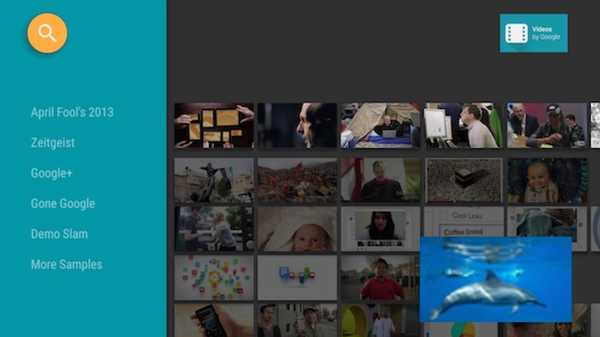
Notification management has been one of the fastest-growing areas in Android, and Oreo takes it a step further with notification channels . Now, users can decide what type of notifications they want to receive from each app, directly from the system settings, without having to access each app's internal settings. Furthermore, notifications can be snoozed from the notification bar to be recalled after 15, 30 minutes, one, or two hours, depending on the user's preference. This feature is very useful for those who need to postpone messages, reminders, or emails and don't want to miss them.

Notification hierarchy and notification dots on icons
Android 8 Oreo introduces a new hierarchy for notifications : active notifications (calls, media playback) appear first, followed by person-to-person notifications (messages, emails), then general notifications (events, reminders), and finally "less important" notifications (suggestions, news, weather). In addition, notification dots appear —small circles above app icons that indicate pending notifications, even if they've been hidden in the notification bar. A long press on the icon displays the notification and quick access options, making it easier to manage and respond to them immediately from the home screen.
Colorful notifications and visually improved interface
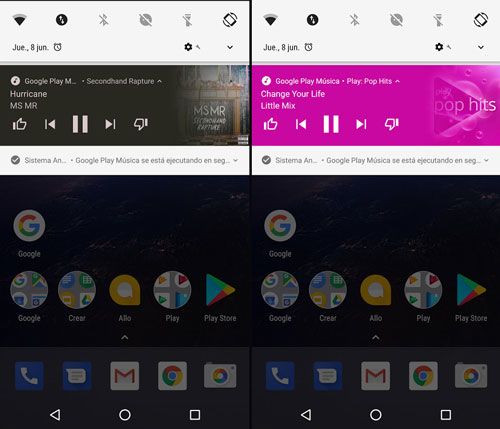
Oreo's notification system has also been revamped: notifications now use background colors that blend seamlessly with the artwork or image associated with the content (for example, album covers or movie posters). This not only enhances the experience but also allows for immediate visual identification of the content of each multimedia notification. Furthermore, the fonts and icons have been standardized, making them easier to read and providing quick access.
Customizing tones and sounds
For the first time, Android natively allows you to add ringtones, notification sounds, and alarms directly from the settings menu by selecting any audio file stored on your device. This eliminates the need for external apps or connecting your device to a computer to customize sounds, making the experience much simpler and more flexible.
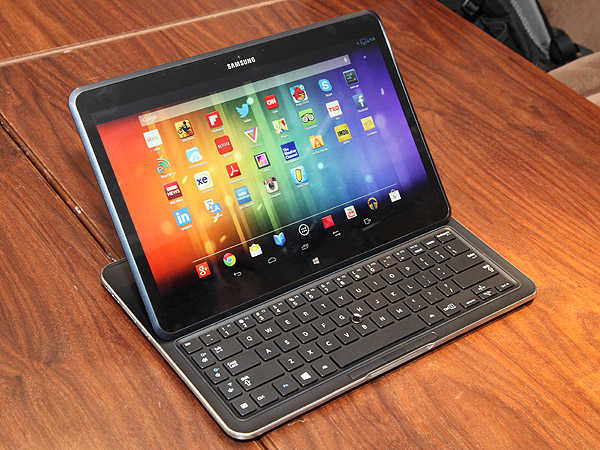
With the rise of convertible tablets and the arrival of Google Play on Chromebooks, more and more users are using Android with a physical keyboard. Oreo improves keyboard navigation : you can move through menus and apps using the arrow keys and the TAB key, following the order defined by the developer. This feature is crucial for improving Android's accessibility and compatibility in productivity environments.
Neighbor Awareness Networking (NAN) and Wi-Fi Aware: A New Connectivity Paradigm
Android 8 Oreo takes Wi-Fi connectivity to the next level with the introduction of technologies like Neighbor Awareness Networking (NAN) and Wi-Fi Aware. Now, compatible devices can discover and communicate directly with each other over Wi-Fi, even without an internet access point, enabling instant file transfers and other collaborative features between nearby devices. Furthermore, Oreo incorporates automatic connection to previously saved and trusted Wi-Fi networks: the system automatically activates Wi-Fi upon arriving home or to a trusted network, saving battery and mobile data without any user interaction.
Bluetooth 5.0, support for advanced audio and smart connections
Android Oreo greatly expands its Bluetooth connectivity capabilities. It offers full support for Bluetooth 5.0 and BLE (Bluetooth Low Energy), resulting in greater range, speed, efficiency, and simultaneous connections with multiple devices. Furthermore, it integrates the high-quality Sony LDAC codec for a superior wireless audio experience. Controlling music libraries and connected devices is now easier and more reliable, positioning Android on par with the most advanced operating systems in Bluetooth technology.
Safe installation of applications and new permissions
Android 8 Oreo strengthens app installation security. The old "unknown sources" setting is gone, and now, to install APK files from outside Google Play, users must explicitly authorize each app that intends to install third-party apps . This prevents malicious apps from installing others without the user's knowledge. Furthermore, apps that want access to critical features (premium SMS, unrestricted data, bypassing Do Not Disturb mode, battery optimizations, etc.) must request special permissions with clear notifications, increasing user protection and control over their data and privacy.
Google's Safe Browsing technology, already familiar in Chrome, is now coming to WebView in Oreo. This allows all apps that integrate web features to inherit protection mechanisms against malicious sites, alerting the user and blocking the loading of pages considered dangerous. It's a significant advancement in mobile security and in preventing malware and phishing.
Smart text selector and raw paste
A new feature powered by artificial intelligence is the smart text selector : when you tap on place names, addresses, phone numbers, or emails, the system automatically selects the full text and suggests opening it in the corresponding app (Maps, Phone, Mail). It also allows you to paste plain text , removing unnecessary styles when copying and pasting from other sources, which is useful for documents and messaging.
The settings menu has been completely reorganized in Android 8. The sections are clearer, with fewer but better-organized categories, adopting a white background, gray icons, and wide margins for a cleaner and more user-friendly look. The quick settings have also been redesigned, using a uniform light gray color and a transparent bar that allows you to see the wallpaper behind the bar and facilitates access to key functions without cluttering the screen with sections.
Colorful multimedia notifications and renewed Ambient Display mode
Oreo introduces a new system for multimedia notifications that automatically adapts background and accent colors based on the album art of the music or video being played. At the same time, Ambient Display mode is improved to show notifications on a black background, along with a smaller clock and the app's dominant color, making it easier to quickly identify the apps responsible for the notifications.

New emojis and backward compatibility
Android 8 Oreo completely redesigns its emojis , abandoning the old teardrop style in favor of circular and expressive figures similar to those already popular on iOS and WhatsApp. It also introduces over 60 new emojis to enrich conversations. Thanks to the "EmojiCompat" compatibility library, some of these new emojis can even be used on older devices, eliminating the need for full system updates just to get the latest emojis.
Kotlin support and developer improvements
Android Oreo incorporates native support for the Kotlin programming language , allowing app developers to work with more modern, secure, and efficient tools. This results in more stable, faster, and easier-to-maintain apps. Furthermore, the new APIs enable streaming update downloads, which are written directly to the device's system partition and can be paused and resumed, minimizing the use of internal storage.
Improvements for devices with limited resources: Android Go
Alongside Oreo, Google is introducing Android Go : an optimized version of the operating system for devices with 1GB of RAM or less. It includes memory optimizations, lightweight versions of key apps, and a smooth user experience even on low-cost phones, expanding access to technology and mobile connectivity in emerging markets.
Visual improvements, new animations, and native theme engine
Oreo adds subtle new animations to icons when notifications are displayed. The first steps are being taken toward a native theme engine , allowing users to change the interface's appearance based on preferences or wallpapers, although its full functionality will be available in future updates. It also features new easter eggs , such as the "Neko Cat" minigame and an animated octopus in the settings, adding touches of fun and personality to the system.
Mobile phones and tablets compatible with Android 8 Oreo
Following the release of Android Oreo, Google collaborated with major manufacturers to accelerate the update's rollout to as many devices as possible. As soon as a manufacturer releases the update for their model, users receive it via notification. The list of officially confirmed (or leaked as highly likely) makes and models includes:
- Google: Pixel, Pixel XL, Pixel C, Nexus 5X, Nexus 6P, Nexus Player
- OnePlus: OnePlus 3, OnePlus 3T, OnePlus 5
- Nokia: Nokia 3, Nokia 5, Nokia 6, Nokia 8
- Samsung: Galaxy S7, S7 edge and S7 Active, Galaxy S8, S8+, Galaxy Note 8, Note FE, Galaxy C7 Pro, C9 Pro, Galaxy Tab S3, Galaxy J5 2017, J7 2017, J7 Prime, Galaxy A3, A5, A7 2017
- Sony: Xperia X Performance, Xperia XZ, XZs, XZ Premium, L1, XA1, XA1 Ultra,
- HTC: U Ultra, HTC 10, HTC U11
- Lenovo/Motorola: Moto Z2 Force, Z2 Play, G5, G5 Plus, G5S, G5S Plus, Z, Z Play
- Huawei and Honor: Huawei Mate 9, Mate 9 Pro, Mate 9 Porsche Design, P10, P10 Plus, Honor 9
- LG: G6, G6+, Q6, V20, G5
- Q: Aquaris X, X Pro, U Plus, U
- Xiaomi: Mi 6, Mi Max 2, Mi 5x, Mi 5C, Redmi Note family
- Essentials: Essential Phone
When will Android 8 Oreo arrive on my phone or tablet?
The arrival of Android Oreo on devices depends on each manufacturer's strategy and the specific model. For brands like OnePlus, Nokia, Sony, Essential, and Huawei, the update is usually available first on the latest and highest-end models, and then gradually rolls out to lower-end devices. Other manufacturers may take a little longer depending on customizations and internal testing. If you're unsure about your device's Android version, you can check it in the system settings or follow the specific guide available on how to find out which Android version your device has.
Update for BQ and other manufacturers?
In the case of BQ , one of the most popular brands in Spain thanks to its excellent price-to-performance ratio, the arrival of Android Oreo depends on official confirmation from the manufacturer. Although there were no firm dates initially, it is expected that at least its most recent models will receive the update if technical and support conditions allow. Other brands and models should check with their respective manufacturers to find out if the update is on its way or if they will have to resort to alternative methods such as custom ROMs.
Frequently asked questions and common doubts about Android 8 Oreo
- Is it worth upgrading to Android Oreo? The answer is yes for most users: the improvements in security, autonomy, customization, and productivity justify the upgrade, especially if your device is compatible and officially supported by the manufacturer.
- Can I install Android 8 Oreo manually? If you have a Pixel or Nexus device, you can install the factory images that Google publishes on its developer site. For other brands, it's recommended to wait for the official update to avoid potential compatibility issues or voiding your warranty.
- Will I lose my data when I upgrade? Official updates typically preserve your data, but it's a good idea to make a full backup before updating.
- What about apps that haven't been adapted to Oreo? They will function normally, but those that don't follow the new guidelines may see their background functions or notifications restricted until they are updated by their developers.
Android 8 Oreo marks a turning point in the evolution of Google's mobile operating system. Its commitment to security, customization, and energy efficiency, coupled with faster update speeds and compatibility with more devices, makes it one of the most comprehensive, balanced, and advanced versions to date. The combination of smart features, visual improvements, and new tools allows users of all types to experience a more robust, customizable, and secure platform, ready for the current and future challenges of digital mobility. If your device is compatible and you receive the update notification, don't hesitate to upgrade to Oreo to enjoy all these benefits.

Table of Contents
- 1 Android 8 Oreo: More secure, smarter, more efficient, and more powerful
- 2 What's new and what's new in Android 8 Oreo?
- 2.1 Adaptive icons and advanced customization
- 2.2 Picture in Picture (PiP) Mode: Enhanced True Multitasking
- 2.3 Multi-screen and sending content to other screens
- 2.4 Strict limits on background apps and better battery management
- 2.5 Project Treble: The giant leap against fragmentation and faster updates
- 2.6 Smart autocomplete and advanced text selection
- 2.7 Notification channels and personalized notification management
- 2.8 Notification hierarchy and notification dots on icons
- 2.9 Colorful notifications and visually improved interface
- 2.10 Customizing tones and sounds
- 2.11 Keyboard navigation and increased accessibility
- 2.12 Neighbor Awareness Networking (NAN) and Wi-Fi Aware: A New Connectivity Paradigm
- 2.13 Bluetooth 5.0, support for advanced audio and smart connections
- 2.14 Safe installation of applications and new permissions
- 2.15 Protected WebView and enhanced browsing security
- 2.16 Smart text selector and raw paste
- 2.17 Redesign of the Settings and Quick Settings menu
- 2.18 Colorful multimedia notifications and renewed Ambient Display mode
- 2.19 New emojis and backward compatibility
- 2.20 Kotlin support and developer improvements
- 2.21 Improvements for devices with limited resources: Android Go
- 2.22 Visual improvements, new animations, and native theme engine
- 3 Mobile phones and tablets compatible with Android 8 Oreo
- 4 Frequently asked questions and common doubts about Android 8 Oreo