

If you're unfamiliar with APK Extractor and have an Android device, it's time to discover one of the most practical tools for managing your apps. We often download apps from the Google Play Store , only to have them removed by Google for various reasons. If you then need to reinstall them on another device, you might find they're no longer available. This is where APK Extractor for Android becomes an essential solution, allowing you to extract and save the APK files of your installed apps, including those that came pre-installed.
What is APK Extractor for and how does it work?

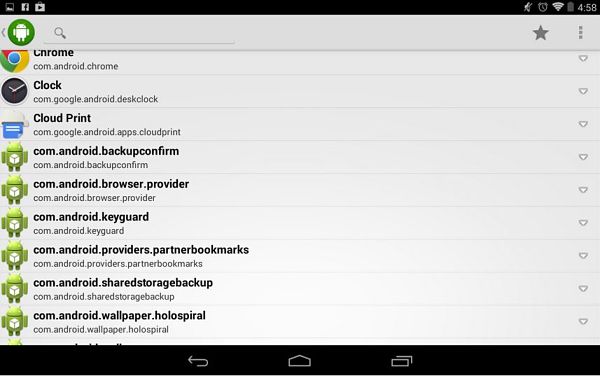
APK Extractor is a very intuitive application that allows you to create a backup of the APK file of every application installed on your Android phone or tablet. This includes both apps you've downloaded yourself and system apps. Its standout feature is its ease of use : when you open the app, it displays a list of all installed applications; simply select one and you can extract its APK with a single tap. The entire process is fast, secure, and doesn't require root access, which sets APK Extractor apart from other similar apps.
By extracting the APK file, you can save it to your internal storage or SD card , making it easy to migrate apps to other devices or reinstall them when needed, even if those apps are no longer available on the Play Store. This feature is also useful for avoiding having to download each app individually if you switch phones or reset your device.
Advantages and advanced features of APK Extractor
In addition to the basic extraction function, APK Extractor offers several options that make it a powerful tool:
- System and user app support: You can extract APKs from both apps you've installed and those that come pre-installed.
- No root required: You don't need to make any advanced modifications or log in as a superuser to use the app.
- intuitive organization: Displays apps alphabetically, differentiating between installed, system, favorite, and hidden apps for easy searching.
- Quick search: It has an internal search engine to easily locate any installed app.
- Customizing the save folder: You can choose where the extracted APKs will be saved, either to internal storage or an SD card.
- Full compatibility with Android smartphones and tablets: It works stably on the vast majority of modern Android devices.
Usage Options: App Backup, Migration, and Analysis
APK Extractor 's functionality goes far beyond creating simple copies. It allows you to:
- Create backups of the installers (APK) for future reinstallations, avoiding searching for unverified versions on sites of dubious reputation.
- Migrate applications easily between devices by copying APK files to the SD card or external storage, making it easy to transfer when switching between Android phones or tablets.
- save mobile data by reinstalling apps without having to download them again, useful when you don't have access to WiFi networks.
- Share apps with friends directly via email, Bluetooth, compatible messaging apps, or any file transfer method.
- Consult detailed information about each app: permissions, version, size and direct link to its listing on the Google Play Store.

Other notable APK extraction apps and alternatives
There are several popular alternatives to APK Extractor on Android, each with interesting features:
- MLManager: It stands out for its user-friendly interface and allows you to extract and share APKs by grouping apps into tabs (installed, system, favorites, or hidden). It also displays relevant information and links to Google Play for managing each app.
- App APK Extractor & Analyzer: It adds advanced options such as analyzing apps using graphs, grouping them by SDK, permissions, installation location or platform, and has a dark mode.
- Meher APK Extractor: With a single tap, it makes it easy to extract, search by name, and share or save APKs—ideal for those looking for simplicity.
Despite the existence of alternatives, APK Extractor remains a lightweight, fast option with excellent compatibility, and it also offers a free version without complicated requirements.
Download and use APK Extractor on your Android device
If you want to try APK Extractor , it's free and compatible with virtually any Android smartphone or tablet. You can download it safely from the Google Play Store and start protecting your favorite apps from accidental deletion or easily migrating them to new devices.


Have you already used this tool? Share your experience and recommendations in the comments to help other users get the most out of APK Extractor for Android.

Table of Contents