

Are you tired of grappling with complex mathematical formulas and looking for a quick and easy way to solve them? Imagine being able to get the solution to almost any math problem simply by pointing your Android phone's camera and taking a picture. This is the revolutionary proposition of AutoMath , an app that has gained the attention of students and professionals worldwide thanks to its ability to simplify calculations and offer detailed, step-by-step explanations.
What is AutoMath and how does it help you with math?

AutoMath is much more than a traditional calculator. This Android app uses advanced optical character recognition (OCR) technology to read and analyze printed mathematical problems. Simply point your camera at the problem, take a picture, and in seconds you'll get the answer, along with an explanation of the steps used to solve it. This makes AutoMath an invaluable resource for schoolwork, independent study, or for professionals who need efficiency and precision in their calculations.
One of the advantages most highlighted by its users is that it works offline , so you can use it anytime, anywhere. Plus, it's free and you can download it directly from Google Play.
Main functions and features of AutoMath
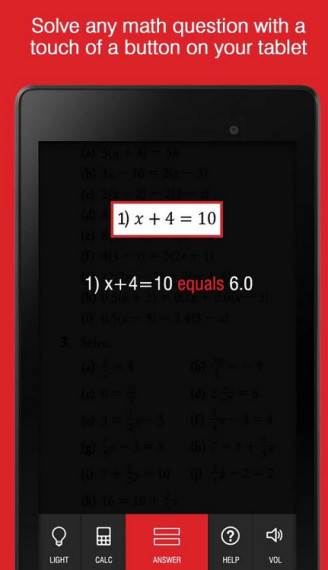
- Instant resolution of mathematical problems photographing printed or on-screen equations. It only requires numbers and symbols to be in a recognizable font, so it doesn't support handwritten operations.
- Support for over 250 math functions, including basic arithmetic (addition, subtraction, multiplication, division), fractions, powers, linear equations, polynomials, square roots, trigonometry, algebra and simplification.
- Smart manual calculator mode to enter equations if you prefer to write them or if the photograph is not accurate.
- step by step explanations of the solution method, making AutoMath a powerful reinforcement learning tool.
- Graphical representation of functions in the permitted problem types. This way, you can visualize results and equations clearly and instructively.
- Does not require internet connection for most of its functions, ideal for use in environments without coverage.
- Simple and minimalist interfaceWhen you open the app, the camera is automatically activated and the function buttons are intuitively laid out.
- Quick tutorial and built-in help, ideal for new users.

Interface and user experience: How AutoMath works on your mobile device

When you start AutoMath, the camera activates automatically. The center button at the bottom is used to capture the image of the mathematical operation. Around it are four other shortcut buttons:
- Turn the flash on or off (to improve capture in low-light environments).
- Manually enter the equation (useful if the photo is not clear or if you want to solve another operation directly).
- Access the help or tutorial section.
- Turn sound on or off.
In the top left corner, you can change the camera's focus mode. Once the photo is taken, the app analyzes the text and displays the result in seconds . If the app makes a mistake recognizing the numbers or symbols, you can always edit the data and correct the operation before getting the final solution.
It's worth noting that, despite being in English, the interface is so intuitive and visual that any user can use it without difficulty. Currently, AutoMath doesn't handle handwritten operations, but its developers are working on expanding this feature in future updates, following the example of other competing applications.
AutoMath Advanced Features: Beyond a Simple Calculator
AutoMath not only solves basic mathematical operations, but also includes a variety of advanced functions that make it stand out among applications in its category:
- Solving algebra equations with step-by-step simplification, ideal for high school and college students.
- Recognition of fractions and complex operations, facilitating the understanding of the procedures to resolve them.
- Breakdown of operations into steps, which allows you to learn the logic behind each calculation and not just get the final answer.
- Graphic mode and table of values to display mathematical equations and functions interactively (in supported types).
- Integration of more than 250 mathematical functions predefined, covering a very wide spectrum of operations without the need for an Internet connection.
The ability to review the steps taken to solve problems is one of its most valued features. In this way, AutoMath becomes a kind of personal tutor, showing not only the solution but also the methodology used, helping users improve their understanding and mathematical skills.
Current limitations of AutoMath and plans for improvement
Although AutoMath is a powerful and effective tool, it has certain limitations that are important to know before you start using it regularly:
- Does not recognize handwritten operations, only printed or displayed on screen in clear font. This can be a drawback for those who are used to taking handwritten notes or exercises in notebooks.
- Does not support highly complex mathematical calculations such as integrals, derivatives, complex systems of equations, or advanced statistics. However, the developers have announced that they are working to expand the range of supported operations.
- There may be occasional failures in the recognition of numbers or symbols., especially if the image quality is not adequate, although this is easily solved by editing the recognized results before obtaining the final answer.
- Available only in English so far, although this does not usually pose a real barrier due to the intuitive nature of its interface.
Despite these limitations, AutoMath continues to evolve and is expected to incorporate new features in future updates, such as handwriting recognition and the ability to solve more difficult math problems.
Comparison of AutoMath with other applications for solving mathematical operations with the camera
The rise in popularity of apps for solving math problems with your camera has led to several alternatives on the market. Some of the best-known, along with AutoMath, are Photomath and CameraMath . Below, we explain how they differ so you can choose the one best suited to your needs.
- AutoMath It stands out for its speed, its offline functionality, the number of built-in functions, and its clear step display. Perfect for elementary and secondary school students, as well as professionals who solve printed or on-screen calculations.
- Photomath represents a slight advance, since it includes handwriting recognition and even more detailed explanations, including interactive graphics and videos. It offers support for more advanced operations and is available on both Android and iOS.
- CameraMath It is positioned as a useful alternative that also allows you to work with images from the gallery, although its range of functions and explanations may be somewhat more limited.
- Google Lens It has also incorporated the ability to perform basic camera operations, although its operation is still far from the depth and customization offered by AutoMath.
The key to choosing the best app for you lies in considering whether your goal is to learn mathematical procedures or simply get quick results . AutoMath is ideal if you're looking for a blend of speed, ease of use, and the ability to check the steps of each solution.
AutoMath as a learning and academic support tool

In today's education, mobile applications like AutoMath have become undeniably important. Teachers and parents see them as an effective support for independent learning, as they foster an understanding of mathematical steps and methods . By showing the steps involved in operations, they not only help solve problems quickly, but also teach students to understand the process, improving their logical and mathematical reasoning.
However, it's important to remember that these apps should be used as a support tool , not as a substitute for learning. Responsible use promotes self-correction and continuous improvement, while excessive use can limit the development of one's own skills. Therefore, it's advisable to use them as a supplement to check results and clarify doubts about procedures, especially at home or as an aid in correcting homework.
What math problems does AutoMath solve?
The list of operations that AutoMath can currently solve covers a wide range of educational and professional levels. Among the problems it solves are:
- Basic operations: addition, subtraction, multiplication and division.
- Fractions and simplification of complex fractions.
- Algebra: solving linear equations, polynomials and basic algebraic simplifications.
- Square roots and powers.
- Simple trigonometry, such as sine, cosine, tangent (in certain versions and according to updates).
- Basic inequalities and inequalities.
- Graphic display and tables of values in the supported problem types.
The ability to solve advanced mathematical problems (integrals, derivatives, complex systems, statistics, or word problems) is constantly developing, but if you need a complete solution in these fields, it is advisable to check if the current version of AutoMath supports it or to use other complementary tools.
How to install and start using AutoMath on your Android
Installing AutoMath on your device is a quick and easy process:
- Go to Google Play and search for “AutoMath.”
- Click “Install” and wait for the process to complete.
- When you open the app, grant the necessary permissions for camera use.
- You can now start photographing equations and experimenting with all their functions.

The app is completely free . Remember that the app's main functions don't require an internet connection, so you can use it whenever and wherever you need it without worrying about mobile data.
AutoMath FAQs and Helpful Tips
- Does AutoMath work with handwritten math operations? Currently, the app only recognizes printed or on-screen text with clear fonts. For handwritten text, we recommend Photomath.
- Can complex equations be solved? AutoMath covers most simple and intermediate-level calculations. For advanced calculus, check out updates or complement it with other applications.
- What happens if the app doesn't recognize a number or symbol correctly? You can edit the resulting data before obtaining the solution, ensuring maximum accuracy.
- Is the app safe and does it respect my privacy? AutoMath only accesses the camera and does not store photos externally, so it is secure in terms of privacy.
Other notable apps for solving math with the camera on Android
While AutoMath is one of the leading tools, there are other alternatives worth knowing that can complement your digital math experience:
- Photomath: It allows you to scan both printed and handwritten exercises and offers detailed explanations, graphics, and videos. It supports more difficult operations, including word problems and advanced calculus in its premium version.
- mathway: Popular for its ability to solve problems from algebra to calculus by entering the operations manually.
- CameraMath: Similar to AutoMath, it allows you to solve equations with photos and analyze saved images. Useful as a spell checker and for step-by-step learning.
- Google LensGoogle's tool is increasingly integrating more math functions into Android, although it is still not as specific or educational as AutoMath.
The variety of options means you can combine several apps depending on the type of operation or the depth of explanation you need.
Recommended uses and considerations for parents, teachers, and students
The use of applications like AutoMath has transformed how math problems are approached in the classroom and at home. However, it is essential to establish responsible use.
- Recommended as wizard to check results and understand procedures, never as a complete substitute for learning or independent work.
- It is very useful for parents who want to help their children with their homework, especially if they don't know the exact solution.
- It allows students to self-correct and improve in areas where they have difficulties, strengthening the assimilation of key concepts.
- Teachers are encouraged to encourage critical thinking: reviewing the steps, understanding the process, and not just copying the answer.
- In school settings, always respect the rules. Misuse of these rules on exams can lead to academic consequences.
AutoMath Updates and Future
The app is under continuous development. Users can expect ongoing improvements to the algorithm, an expanded catalog of operations, handwriting support, and an even more customizable and multilingual interface. Your feedback is essential to its growth , so you can always provide suggestions through the app itself or its online communities.
AutoMath for Android has established itself as one of the most comprehensive, fastest, and most effective tools for solving math problems using your camera. Its ability to simplify calculations, offer detailed step-by-step explanations, and work offline makes it an indispensable app for both students and professionals. By combining it with other alternatives when necessary and using it responsibly, technology becomes the best ally for mastering mathematics.
Have you already tried AutoMath or any of the apps mentioned? Your opinion and experience may be useful to other readers, so feel free to leave your comments and ratings below.
Table of Contents
- 1 What is AutoMath and how does it help you with math?
- 2 Main functions and features of AutoMath
- 3 Interface and user experience: How AutoMath works on your mobile device
- 4 AutoMath Advanced Features: Beyond a Simple Calculator
- 5 Current limitations of AutoMath and plans for improvement
- 6 Comparison of AutoMath with other applications for solving mathematical operations with the camera
- 7 AutoMath as a learning and academic support tool
- 8 What math problems does AutoMath solve?
- 9 How to install and start using AutoMath on your Android
- 10 AutoMath FAQs and Helpful Tips
- 11 Other notable apps for solving math with the camera on Android
- 12 Recommended uses and considerations for parents, teachers, and students
- 13 AutoMath Updates and Future