

Personalizing your Android phone is much more than choosing a stylish case or changing the wallpaper. One of the most direct and original ways to truly make your smartphone your own is to choose a ringtone or melody that represents you or that you simply like. With current Android phones, you can use any MP3 file as a ringtone, but finding the perfect site to download ringtones or melodies, and especially doing so in a completely free, convenient, and fast way, is often not so easy.
In this comprehensive article, you'll discover the best apps for downloading ringtones and melodies on Android , updated with information from top sources and user reviews. Whether you're looking for a huge ringtone library, want to create your own, or access original sounds for every occasion, here you'll find the most complete, secure, and functional options available.
The best applications to download ringtones and melodies on Android

- Zedge
- Ringtone maker
- Audiko
- Music Ringtones for Android
- MP3 Ringtones Free Download
- Media.io Online Ringtone Maker
- More specialized applications
Let's take a detailed look at what each app offers, their unique benefits, how they work, and all the useful information you need to help you choose the best option based on what you're looking for and the type of customization you want to give your phone.
Zedge: the most complete app for downloading ringtones, wallpapers, and customizing your phone.

Zedge has been around for many years and remains a favorite app for millions of users who want to download ringtones, notification sounds, wallpapers, and themes completely free of charge and with a huge selection. One of its biggest advantages is its massive library, with millions of ringtones, sound effects, songs, and original melodies in all styles: pop, rock, funny sounds, effects, classic ringtones, movie soundtracks, and much more.
Among the most notable features of Zedge are:
- Organization by categories and top downloads; find popular, new, or country-specific ringtones.
- Preview and direct assignment: You can listen to each tone before downloading it and set it as a ringtone, notification tone, or for specific contacts directly from the app.
- Seasonal customization: Themed backgrounds and ringtones for events such as Christmas, Halloween, Valentine's Day, birthdays, graduations, etc.
- Favorites and synchronization: You can save your favorite ringtones and retrieve them if you change your phone.
- Free and very light, with a user-friendly interface and constantly updated.
Zedge is ideal for those who want to fully customize their phone without complications and with variety for the whole family. It excels not only in ringtones, but also in wallpapers, themes, and stickers, covering every visual and audio aspect of the phone.
In numbers, it has surpassed 100 million downloads on Google Play alone, and its average rating is around 4,6 stars, a testament to its quality and popularity. It's simply the essential app for customization on Android.
You can download Zedge from the Google Play Store for free.
Ringtone Maker: Create and customize your ringtones easily
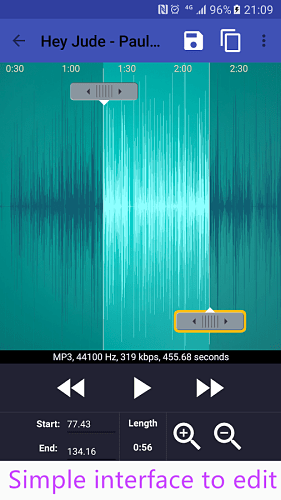
Ringtone Maker is the perfect app if you're creative and looking to further personalize your phone, as it lets you convert any MP3 file stored on your device into a ringtone, notification sound, or alarm. It's especially useful for selecting the exact part of the song you want (for example, the chorus), thus avoiding classic, predictable ringtones or long song intros.
Its main functionalities are:
- Easy audio editor: Select the start and end point, trim and instantly save any fragment of your songs.
- Support for multiple formats: Not only mp3, but also WAV, AAC, AMR and other popular formats.
- Simple and practical interface, ideal for users without experience in audio editing.
- Possibility of storing your created ringtones and assigning them to contacts, alarms, notifications, etc.
- Allows you to record sounds directly and convert them into tones.
Ringtone Maker has been downloaded by over 50 million users and maintains a rating of over 4,2 stars, positioning itself as the best ringtone editing app for Android.
Ideal if you want your phone to sound unique and different, personalizing it down to the last detail. You can combine it with other sound banks or songs you download to your device.
Audiko: Choose and share original ringtones from a global community
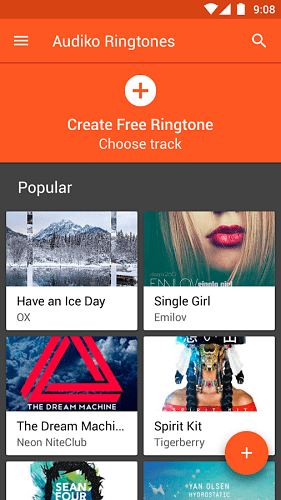
Audiko is one of the most recommended apps because it combines direct downloads of popular and exclusive ringtones from a huge database with a powerful editor to create, trim, and customize your own ringtones.
Among its notable features:
- Access to thousands of trendy shades Updated daily, including popular songs and original sounds created by users around the world.
- Classification by genre, theme and national tops, making it easy to find the ideal melody for each user or situation.
- Function to create and edit your own ringtones from any audio file stored on your mobile phone.
- Option to share your ringtones with the Audiko community and download other users' creations.
Audiko has over 5 million downloads and a 4,3-star rating, with users highlighting the quality of its music collection and the ease of creating custom ringtones.
Music Ringtones for Android: An international library of over 10.000 ringtones
Music Ringtones for Android is an application that allows you to access a database of more than 10.000 ringtones and melodies from all over the world, conveniently organized by categories: pop music, electronic, rock, funny sounds, children's, animals, R&B, hip-hop, gospel, Bollywood, K-pop and many more styles.
Its distinctive advantages:
- possibility of search by popularity, new releases, or trends.
- Assign different ringtones to different contacts, easily distinguish calls, messages, alarms, and notifications.
- Intuitive and fast interface, ideal for those looking for variety and quality without complications.
- Each shade has been selected for being among the most appreciated by users worldwide.
If you want to experiment with original sounds, fully customize each contact, or browse globally popular music styles, this is a highly recommended option.
MP3 Ringtones Free Download: High-quality ringtones for all tastes
MP3 Ringtones Free Download is an app with a selection of over 450 high-quality ringtones and notification sounds. It allows you to download ringtones, preview them before downloading, and set each sound as your ringtone, message tone, or alarm directly within the app. It also offers:
- Home screen widget: Quickly access your favorite tones.
- Categories for all audiences: romantic, funny, professional, retro, classic, children's, movie and more.
- Built-in MP3 trimming tool and system to record your own ringtone.
- Daily downloads of new sounds to keep your repertoire fresh.
Ideal for those looking for a simple, reliable app with a good selection for every occasion.
Media.io Online Ringtone Maker is an online tool compatible with Android and iOS for easily creating custom ringtones without installing any app . You can use it from any mobile or desktop browser, and it supports a wide variety of formats (MP3, M4A, OGG, WAV, etc.).
Main advantages:
- Works 100% online: does not take up space on your mobile.
- You can trim songs, add fade in/fade out effects, and export in formats compatible with both Android and iPhone.
- Very useful if you want to quickly create ringtones with files stored on your device or in the cloud.
- Completely free tool with no intrusive advertising.
Especially recommended for users who prefer web-based tools and want to avoid installing more apps on their mobile.
Other notable apps for ringtones and notifications on Android
- Best Funny Ringtones: collection of fun and original sounds.
- Romantic love tones: romantic melodies for special calls.
- Ringtones Sound Effects: Ideal for those looking for special effects and impressive sounds.
- Animal Sounds Ringtones: Perfect for lovers of animal sounds, from domestic to wild.
- MP3 Cutter and Ringtone Maker: combines audio editor and tone database.
- Ringtones notifications: oriented to short tones for notifications and alerts.
- Popular Ringtones: Collects the most popular tones updated daily.
- Classical music ringtonesIf you're passionate about classical music, you'll love this app.
- Christmas Ringtone: Christmas and festive tones for special dates.
- Business Ringtone: more formal tones for professional environments.
Tips and tricks for customizing ringtones on Android

In addition to downloading apps, it's important to know how to set your custom ringtones and get the most out of each app. Here are some helpful tips for fully customizing your Android phone:
- Choose the ideal tone for each contact, notification, or alarm. Many apps allow you to assign specific ringtones to each person in your address book, so you can recognize who's calling without looking at your phone.
- Download the ringtones in MP3 format or compatible (WAV, OGG, AAC, etc.) to avoid problems when assigning them.
- Save your audio files in a specific folder (for example, “Ringtones”) within the internal memory so that they are recognized by the system.
- Access sound settings from your mobile, go to ringtones and select “add new” to search your personal files.
- To set ringtones from an app, most include an option to "set as ringtone," "notification tone," or "for specific contact." If the app allows it, you can change it with a single click.
- With apps like Zedge, you can manage your favorites and restore them after changing phones simply by logging into your account.
Frequently asked questions about downloading ringtones on Android
- Is it safe to download ringtones from these apps? All the apps recommended in this article are popular, safe and endorsed by millions of users. Even so, always download from the Google Play Store or official sites.
- Do you have to pay for the tones? Most of the apps listed here are fully Returns or have large catalogs of free ringtones. Some offer optional purchases to access premium content or remove ads.
- Can I use a snippet of any song? With apps like Ringtone maker o Media.io Online Ringtone Maker You can cut out the exact fragment you want and convert it into a tone for any use.
- What happens if I change my phone? Many apps, such as Zedge, allow you to log in and sync or restore your favorite ringtones.
- How do I change the ringtone for a specific contact? From the Android contacts app itself, select the contact, tap Edit, and look for the option to change the ringtone for that person only.

Table of Contents
- 1 The best applications to download ringtones and melodies on Android
- 1.1 Zedge: the most complete app for downloading ringtones, wallpapers, and customizing your phone.
- 1.2 Ringtone Maker: Create and customize your ringtones easily
- 1.3 Audiko: Choose and share original ringtones from a global community
- 1.4 Music Ringtones for Android: An international library of over 10.000 ringtones
- 1.5 MP3 Ringtones Free Download: High-quality ringtones for all tastes
- 1.6 Media.io Online Ringtone Maker: Create Custom Ringtones in Your Browser
- 1.7 Other notable apps for ringtones and notifications on Android
- 2 Tips and tricks for customizing ringtones on Android
- 3 Frequently asked questions about downloading ringtones on Android