

Currently, downloading free music on Android is one of the most sought-after practices for users who want to enjoy their favorite songs without relying on an internet connection or using mobile data. Despite advancements in streaming platforms, having your music library stored on your mobile device still offers significant advantages. In this article, you'll find the most comprehensive and up-to-date collection of legal apps and methods for downloading music to your Android smartphone or tablet, along with tips, tricks, and alternatives to ensure you have everything you need.
Why is downloading free music on Android still so popular?
With the arrival of music streaming apps like Spotify, Deezer, Apple Music, and YouTube Music , it might seem that downloading songs has become less important. However, downloading music for offline listening remains key for reasons such as:
- Listen without Internet: Ideal for airplanes, long journeys or places without coverage.
- mobile data saver: Perfect for those with limited plans.
- custom organization: Allows you to create playlists, folders and use any player offline.
- Secure access: You will have your music without depending on external services.
For these reasons, apps for downloading music on Android remain a necessity for millions of people.

How to download free music on Android: methods and legal considerations
Before diving into the list, it's crucial to understand some legal and security points. Downloading copyrighted music illegally is prohibited . However, there are countless royalty-free songs, albums, and entire music libraries (Creative Commons, public domain) that you can download and use on your Android devices without worry.
In this guide you will find:
- Legal and safe applications to download free music
- Apps specialized in MP3, FLAC, AAC, etc. files.
- Tools to download music from YouTube or other video platforms
- Recommended websites to download music from your browser
- Options to download copyright-free music for your projects
- Premium streaming and paid alternatives
The best Android apps to download free music
There are numerous methods and apps for downloading music on Android. Here are the most reliable, secure, and easy-to-use ones, along with a detailed explanation of their features, advantages, and limitations. Keep in mind that availability may vary, and some apps may not be on Google Play, but you can always install them from trusted repositories like F-Droid or official APKs.
1. NewPipe: Download music and videos from YouTube quickly and easily
NewPipe is an open-source application that allows you to download audio from YouTube videos in MP3 and other formats, with a quality of up to 160 kbps. Its interface is lightweight, intuitive, and designed to consume minimal resources.
- Advantages: No ads, fast, downloads in multiple formats, integrated search.
- How to use it: Just search for the song or video, click the download button, and choose the format (audio or video).
- Legality: Recommended use for free content or for personal and private use.
You can install it from trusted websites . Not available on Google Play.

2. YMusic: Download music directly from YouTube Music
YMusic is another app that converts YouTube videos into audio files ready for offline listening. Its search engine lets you filter songs, albums, and artists, and create custom playlists.
- Download in MP3 and M4A to different qualities.
- Built-in player with battery saving modes and customization.
- Ideal for finding popular and trending music thanks to the YouTube Music engine.
- Like NewPipe, it is not on Google Play and must be installed via APK from trusted sources.
3. Download free music (SoundCloud Music Downloader)
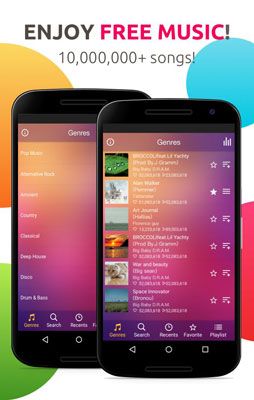
Among the most popular apps for downloading free music on Android , this application stands out, drawing directly from SoundCloud , the largest repository of independent and emerging artists. It offers access to over 10 million songs across various genres, styles, and artists.
- Allows you to search by song, artist or album.
- Direct download in MP3 format.
- No coin system, but it includes ads.
- Intuitive and visually appealing interface.
- Constantly updated catalog.
It's perfect for those looking for royalty-free music , discovering new artists, and especially for those who work with content on YouTube, podcasts, and videos and need songs for creative projects.
4. FrostWire: Download music and torrents on Android
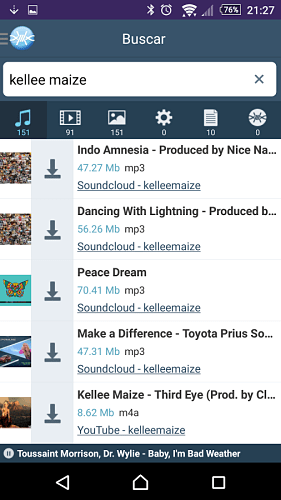
FrostWire is a multimodal download manager that allows you to download music files not only from P2P networks (BitTorrent), but also from cloud platforms and its own search engines. It includes an internal search engine to find music files, videos, or documents and download them directly.
- Supports torrent files and magnet links.
- Advanced download management: paused, resumable, management by WiFi network or mobile data.
- Integrated file browser and player to listen to and manage your downloads without leaving the app.
- Also available for Windows, Mac and Linux, making it easy to transfer music between devices.
5. Fildo: Download music from various integrated services
Fildo is an app that, although not available on Google Play, aggregates music search engines from various sources, including NetEase (the 'Chinese Spotify'). It allows users to download entire albums, individual tracks , and create playlists with recommendations.
- Simple interface but efficient.
- Ideal for fans of pop, rap, Latin music and international genres.
- Requires download from the official website.
- It offers quality filters and makes it easy to share music with other users.
6. Audiomack: Download songs and listen to music offline
Audiomack is a premium alternative, but with free downloads of current and trending music in genres like hip-hop, rap, R&B, EDM, Afropop, reggae, and Latin music. It features offline mode, playlists, recommendations, and a hits section.
- Allows you to listen to and download songs offline, although some features require an account (free or premium).
- Own player and compatibility with Android Auto and Wear OS.
- No ads in the paid version, but fully functional in the free version.
- Access to millions of tracks from popular artists.
7. MP3 Hunter: Creative Commons royalty-free music
MP3 Hunter stands out for its selection of Creative Commons licensed songs , ideal for content creators, videos, podcasts, and commercial projects. It includes a search engine by genre, hashtags, and specific categories.
- The interface is simple but functional.
- You can filter by pop, rock, electronic, classical, etc.
- Perfect for those looking for download music for free legally for any purpose.
8. Download Music (CCMixter and Free Music Archive)
This application provides access to the CCMixter catalog , a leading website for royalty-free music used in videos, presentations, and multimedia content. The catalog includes thousands of free-to-use tracks.
- Developed by third-party developers using the public API.
- Allows searches by genre, artist, popularity.
- Downloads may require coins, but they can be reactivated by installing and uninstalling the app.
- Includes internal player.
For more information, check out other apps for downloading free music on Android . You can find the app (not available on Google Play) on the official website or verified alternative repositories.
9. Jamendo Music: Thousands of free songs and an Android app
Jamendo is a leading royalty-free music portal with its own Android app. Its library boasts over half a million songs from independent artists worldwide, with options for both streaming and direct download.
- Free and easy to use.
- Catalog organized by genre, mood, and new releases.
- Thematic playlists and personalized recommendations.
- Ideal for discovering new music and supporting emerging creators.
10. Free Music Archive (FMA): The most famous copyright-free music archive
Free Music Archive (FMA) boasts a vast database of free and royalty-free songs . It offers both an app and a website, allowing users to download music by category, genre, and mood . It's a go-to resource for those seeking soundtracks for YouTube videos, podcasts, and commercial projects.
- Integrated player to listen before downloading.
- Voluntary donations to support creators.
- Huge musical diversity.
11. Icons8 Music: Download songs for any need
Icons8 Music is ideal for those who need background music, effects, and tracks for videos or presentations. Its website offers a catalog of thousands of songs, filterable by 52 musical categories and 47 different genres . It allows free MP3 downloads and, through payment or subscription, higher-quality WAV downloads.
- It doesn't have an app, but the website is highly functional.
- Perfect for professional and leisure use.
12. Bensound: Free music bank with professional quality
Bensound emerged as a platform where artists like Benjamin Tissot and others share royalty-free music for download and audiovisual projects. The music is organized by genre (cinematic, electronic, acoustic, jazz, etc.) and allows free download with attribution.
- Ideal for business presentations, videos and podcasts.
- Fast download and no registration required.
- A premium subscription eliminates the need for attribution and provides access to higher-quality formats.
Alternative methods and websites to download free music on Android
Besides apps, there are perfectly legal websites where you can download music directly from your browser, without needing to install anything. These sites offer royalty-free songs for any use or even music from major artists under certain conditions.
- audionautix: gigantic catalogue suitable for all projects.
- musopen: classical music in the public domain.
- incompetech: works for videos, podcasts and radio.
- Internet Archive: section of album covers and old tracks.
- Album Art Exchange: to organize your library visually.
Downloading is free and fast on all of them, so it's always advisable to check the usage licenses before incorporating songs into commercial or public projects.

How to download music from YouTube and other video platforms
YouTube, Vimeo, and Vevo remain inexhaustible sources for finding music in all styles. However, direct downloads are limited or prohibited by their terms of service. Therefore, if you need to download music from YouTube for private or creative use (respecting copyright), you can use applications and tools such as:
- NewPipe: allows you to extract the audio in high quality.
- GetTube: app to download videos and audios easily (requires downloading from sites outside of Google Play).
- FLVTO: web platform for converting videos into MP3 files directly from the browser.
These tools are useful for creating your own offline playlists, but remember to use them only for content that is freely distributed or licensed under licenses that allow it.
Related to the best Android apps to download free music: Y Music Converter and YouTube Video Music MP3 APK
Apps to download your own music and offline players
If you already have a music library on your computer, you can easily transfer it to your smartphone using tools like AirDroid, Google Drive, OneDrive, or Dropbox . There are also advanced music players that allow you to organize, listen to, and manage your downloaded music offline.
- Pulsar: Lightweight player with equalizer and support for multiple formats.
- Jet Audio HD: Advanced equalizer and premium sound quality.
- Poweramp: Support for FLAC, MP3, WAV and more.
- AIMP: versatile and compatible with custom lists.
These apps not only play music downloaded from other sources, but also allow you to edit metadata, add cover art, and create unlimited playlists.
Apps to download free music without registration and without ads
Looking for apps to download music without creating accounts or dealing with ads ? Most free options today include ads. However, there are open-source solutions and specialized websites that offer music without registration and without banners, especially for copyright-free music.
- Internet Archive: Historical music and sounds, without restrictions.
- Music banks like Free Music Archive, Jamendo or Bensound: Most allow direct download in MP3.
Payment options and streaming alternatives for legally downloading music
In addition to free apps and websites, premium platforms remain one of the most convenient, secure, and legal ways to download songs and full albums directly to your phone. Among the most recommended are:
- Spotify: Download offline on mobile and computer with premium account.
- Amazon Prime Music / Amazon Music Unlimited: Millions of songs to download and listen to offline.
- Apple Music: Full access to the music library with download capabilities.
- YouTube Music: allows you to save music to listen to without internet (premium subscription required).
These alternatives offer the highest sound quality, the security of complying with the law, and the peace of mind of having your music always available even without an Internet connection.
Comparison of downloadable music formats: MP3, FLAC, AAC, M4A and more
When downloading free music on Android, it's essential to know the most commonly used audio formats , as each one has advantages and limitations in terms of both quality and compatibility:
- MP3: The most popular and compatible; good value for money.
- AAC: better compression than MP3, widely used on Apple devices.
- FLAC: lossless format, ideal for audiophiles but requires more space.
- M4A/ALAC: Lossless version recommended for advanced users and Apple ecosystems.
- OGG Vorbis: patent-free, free and good quality format.
The best Android apps typically support all of these formats, and advanced players allow you to adjust the quality based on space and user needs.
Tips for organizing your downloaded music library
Proper management of your downloaded music maximizes the user experience. Here are some tips and resources to keep your library organized :
- Folders by genres, artists or albums: This way you will easily locate everything.
- Add covers and metadata: use tools like Album Art Exchange o Google images to keep your albums well illustrated.
- Backup in the cloud: Protect your songs in case of loss or change of device.
Apps and websites to download free music on other devices
iOS: Options for iPhone, iPad, and iPod
- evermusic: Music player and downloader in multiple formats (MP3, AAC, M4A, WAV, AIFF, M4R). Compatible with iCloud and other cloud services.
- Freegal Music: More than 15 million songs and 200 genres to download legally, with a neat and updated interface.
PC, Mac, and Linux: Programs to Download Music to Your Computer
- uTorrent: BitTorrent client for downloading full albums (requires reliable torrent trackers).
- Ares: veteran for P2P downloads, with integrated search engine.
- iMusic: Download music from Spotify, YouTube, Apple Music, Vevo and more, compatible with Mac and Windows.
- Mediahuman YouTube to MP3: Convert YouTube videos to high-quality MP3, with free and paid options.
- ClipGrab: Download MP3 music from multiple video platforms.
- Softorino YouTube Converter 2: Built-in video browser, fast download and direct export to iOS.
- Apps like Tubemate to download YouTube videos.
Other alternatives and tricks to download free music
SoundCloud and Bandcamp remain key platforms for independent musicians, allowing direct downloads of certain tracks. Simply log in and check the "download" option for each song or album. These options are ideal for discovering new talent and supporting emerging music.
In the case of Spotify , some songs can be listened to offline if you have a premium account. YouTube offers the option to subscribe to download and save your favorite playlists.
Recommended music player apps for listening to your downloaded music
- Press Music Player: Fast, ad-free, and with night mode.
- Poweramp: Professional equalizer, advanced compatibility.
- AIMP: Support for OGG, WMA, MP3 and more.
- Jet Audio HD: Multiple effects and high playback quality.
- Rocket player: Chromecast compatible, polished interface.
Each of these players will give you greater control over your music, allowing you to create playlists, sort, filter, and get the most out of your offline collection.
Frequently Asked Questions About Downloading Music on Android
- Can I download any song for free? Only royalty-free music, in the public domain, or with the authors' permission. Commercial music requires payment or the use of premium services.
- Is it legal to download music using these apps? As long as you respect the rights indicated by the platform. The apps listed here prioritize legal or Creative Commons sources.
- What happens if an app isn't on Google Play? You should always download from secure sites and check permissions. Recommended apps have a good reputation in the community.
- What is the best format for quality and compatibility? MP3 is the most universal. If you're looking for the highest quality, download in FLAC or ALAC.
- What to do if an app requires coins? Check your settings; some users reinstall the app to get more credits, but it's best to look for alternatives without limitations.
Safety tips for downloading free music on Android
- Avoid unknown apps or those with excessive permissions.
- Never download APKs from unofficial websites.
- Check out the comments and ratings to detect possible risks.
- Keep your antivirus updated and check that the apps do not contain malware.
The best Android apps for free music downloads: quick selection
- NewPipe – Open source, lightweight and secure.
- YMusic – YouTube music and custom playlist specialist.
- jamendo music – Huge catalog of copyright-free music.
- Frostwire – All in one: torrents, cloud and player.
- Free Music Archive (FMA) – Songs for videos and free projects.
- MP3Hunter – Creative Commons music by genres and hashtags.
- Audiomack – Trending music to download and listen to offline.
- Icons8 Music – Professional quality sound bank and tracks.
- bensound – Music for creators and commercial use with attribution.
- Download free music (SoundCloud/CCMixter) – Ideal for creative projects and free content.

Table of Contents
- 1 Why is downloading free music on Android still so popular?
- 2 How to download free music on Android: methods and legal considerations
- 3 The best Android apps to download free music
- 3.1 1. NewPipe: Download music and videos from YouTube quickly and easily
- 3.2 2. YMusic: Download music directly from YouTube Music
- 3.3 3. Download free music (SoundCloud Music Downloader)
- 3.4 4. FrostWire: Download music and torrents on Android
- 3.5 5. Fildo: Download music from various integrated services
- 3.6 6. Audiomack: Download songs and listen to music offline
- 3.7 7. MP3 Hunter: Creative Commons royalty-free music
- 3.8 8. Download Music (CCMixter and Free Music Archive)
- 3.9 9. Jamendo Music: Thousands of free songs and an Android app
- 3.10 10. Free Music Archive (FMA): The most famous copyright-free music archive
- 3.11 11. Icons8 Music: Download songs for any need
- 3.12 12. Bensound: Free music bank with professional quality
- 4 Alternative methods and websites to download free music on Android
- 5 How to download music from YouTube and other video platforms
- 6 Apps to download your own music and offline players
- 7 Apps to download free music without registration and without ads
- 8 Payment options and streaming alternatives for legally downloading music
- 9 Comparison of downloadable music formats: MP3, FLAC, AAC, M4A and more
- 10 Tips for organizing your downloaded music library
- 11 Apps and websites to download free music on other devices
- 12 Other alternatives and tricks to download free music
- 13 Recommended music player apps for listening to your downloaded music
- 14 Frequently Asked Questions About Downloading Music on Android
- 15 Safety tips for downloading free music on Android
- 16 The best Android apps for free music downloads: quick selection