

The security of Android devices has become a top priority in today's digital world. Smartphones store a wealth of personal data, contacts, photos, banking information, and sensitive documents, so losing or having them stolen can be a real headache. Fortunately, there are numerous anti-theft apps for Android phones that not only allow you to locate your device but also offer a range of advanced options to protect your privacy and increase the chances of recovering your phone.
In this article, you'll find a detailed analysis of the best anti-theft apps for Android , from leading options like Cerberus to various free and paid alternatives that compete in terms of features, ratings, and ease of use. You'll also learn how to get the most out of built-in tools like Google's Find My Device , how to distinguish between truly useful features and passing fads, and how to complement your security with practical tips to prevent unpleasant surprises in any situation.

Why install an anti-theft app on your Android?
Protecting your Android device from theft, loss, or misplacement is more than just peace of mind . A smartphone isn't just an object of monetary value; it's the key to your digital identity and access to sensitive information. Therefore, theft or loss of mobile phones can have serious consequences , from unauthorized access to your personal data, accounts, and services, to the fraudulent use of your phone numbers or the dissemination of private information.
Installing an anti-theft app allows you to:
- Locate your Android phone in real time thanks to GPS, Wi-Fi networks and mobile network signals.
- Block remote access to prevent unauthorized use and protect your data from third parties.
- Remotely wipe data in case of emergency, preventing them from reaching the wrong hands.
- Activate audible alarms even with the device in silent mode to attract attention or locate it in public environments.
- Capture images, record audio or video covertly to identify the potential thief or intruder.
- Prevent the phone from being turned off, changed, or tampered with. until you authorize it.
- Send personalized messages to the mobile screen with contact information or warnings to whoever finds it.
Prevention is always the best strategy , but having a well-configured anti-theft app tailored to your needs maximizes protection and makes recovering your smartphone easier.
Comparison of the most recommended anti-theft apps for Android
You can find dozens of anti-theft solutions on Google Play and other app stores. However, not all offer the same level of security or features. Here are the most reliable, powerful, and highly rated by both users and security experts:
- Cerberus Anti-Theft
- Android Device Manager (Google Find My Device)
- AVG Anti-Theft (integrated into AVG AntiVirus)
- Bitdefender Anti-Theft and GPS
- Lookout Security and Antivirus
- Prey Anti Theft
- Anti-Theft Alarm (MMAppsMobile)
- Phone Anti-Theft Alarm/Don't Touch My Phone
Cerberus: The benchmark in anti-theft apps for Android
Cerberus is an Android-only app that has gained popularity for its combination of advanced features and ease of use . It allows you to remotely control your phone via SMS or its website, locating the device, locking it, activating alarms, erasing data, and much more. Cerberus's most notable feature is its ability to continue operating even if the thief changes the SIM card or tries to uninstall the app , as well as the option to hide its icon to remain undetected.
Among Cerberus' key functions are:
- Precise real-time location by GPS, Wi-Fi or cellular network triangulation.
- Remote locking with code and personalized messages that alert the user who finds it.
- Loud audible alarm which is activated even if the mobile is in silent mode.
- Complete data erasure both in the internal memory and on the SD card.
- Hidden photo capture, audio and video recording from the environment or the person handling the mobile.
- Call and SMS log facts from the stolen device.
- Notification of SIM card changes or suspicious manipulation.
- False shutdown to make it appear that the mobile is inoperative while continuing to run in the background.
- Compatible with multiple devices and web access for centralized control.
This app offers a seven-day free trial and requires a one-time payment afterward. It allows you to protect up to three Android devices with the same account and manage everything from your computer.
How does Cerberus work and what makes it different?
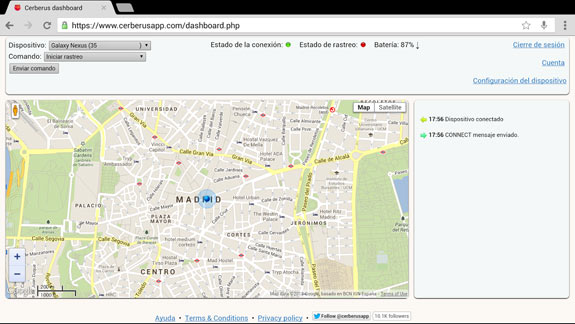
Setting up Cerberus is simple: just download the app from Google Play, create an account on their website, and link your devices. From then on, you can manage your phone's security from any web browser or, if necessary, via SMS commands in case your device loses internet connection.
In case of loss or theft you can:
- Track your phone from the Cerberus website, displaying your current location or location history, even if the device tries to be hidden.
- Activate a powerful audible alarm to try to recover it in public places.
- Completely erase the information on your mobile phone, including the contents of the SD card and internal memory.
- Lock the device with a personalized security code and display messages to the user who finds it.
- Collect multimedia evidence: Take screenshots, record video, audio, or even identify the thief using photos from the front camera.
- Get the list of calls and SMS made after the theft, to present it as evidence.
- Receive automatic alerts if the SIM is changed, the phone is turned off, or the security system is tampered with.
These capabilities place Cerberus among the most complete and advanced anti-theft apps for Android , especially for users looking for a higher level of control and customization than what the system's free options offer.
Android Device Manager: Google's official choice
Find My Device (or Android Device Manager) is Google's official solution for protecting your phone from theft or loss. It comes pre-installed on most Android phones and allows you to locate, lock, or erase your device from the web or any other Android device. For more details on how to get the most out of this tool, see our guide on how to protect your Android device on Android 8.0 Oreo.
Its main functions include:
- Real-time location of the device as long as you are connected to the Internet and have GPS active.
- Remote lock with personalized message to make it difficult to access your data.
- Sound alarm that rings even if the phone is in silent mode.
- Remote wipe of all data of the mobile phone as a last resort for protection.
It is completely free and easy to use, although it does not have advanced features such as photo capture or SIM registration that other specialized applications do offer.
AVG Anti-Theft: Advanced security built into an antivirus
The AVG AntiVirus app for Android includes a powerful Anti-Theft feature , allowing you to:
- Locate and lock the device remote form.
- Capture images of the thief using the front camera after several failed unlocking attempts.
- Record audio secretly to try to identify the mobile's environment.
- Send messages to the home screen or activate alarms remotely.
- Identify the last known location from the mobile if the battery runs out.
- Protect files and apps with a PIN or fingerprint.
The free version already covers basic functions, but the Pro version adds extra levels of protection and control. To expand your security resources, you can also consult our dedicated Bitdefender Maximum Security page.
Bitdefender Anti-Theft and GPS
Bitdefender Mobile Security includes an anti-theft module that allows:
- Immediate location of the device.
- Remote lock and data wipe in case of emergency.
- SIM change notification with the new number sent to a trusted contact.
- SMS control to block, locate, or make the mobile call a predetermined number.
Lookout Security and Antivirus
Lookout is an app that combines antivirus and anti-theft protection features. Among its most relevant features:
- Remote location and alarm.
- Notifications when changing SIM or turn off the device.
- Automatic photo capture when it detects improper access or suspicious manipulation.
- Email alerts against suspicious unlocking attempts.
Prey Anti-Theft: Multi-platform and effective
Prey is an application available on Android, iOS, and computers, allowing you to centralize the security of up to three devices for free (or expand with paid plans). Its features:
- Mobile location and tracking.
- Lock, remote wipe and alarm activation.
- Generating activity reports and collection of multimedia evidence.
- Protection against unwanted uninstallation.
Other popular and specific anti-theft apps
In addition to the more popular options, there are apps designed for very specific functions or to cover situations where the risk of theft is higher:
- Anti-Theft Alarm (MMAppsMobile): Allows you to set alarms that are activated by any unauthorized movement or manipulation of the mobile phone, ideal for public places, at the beach, pool or while charging the phone.
- Phone Anti-Theft Alarm/Don't Touch My Phone: Specialized in detecting unauthorized movement or access. It triggers alarms if someone moves the phone, unplugs it from the charger, or removes it from their pocket. Ideal for those seeking quick and visible protection in high-risk environments.
Visual comparison and feature summary
To help you choose the most suitable option, here is a comparison table of the main anti-theft apps for Android :
| Application | GPS location | remote lock | Erasing data | Capture photos/audio | Sound alarm | SIM change notice | Free/Paid |
|---|---|---|---|---|---|---|---|
| Cerberus | Yes | Yes | Yes | Yes | Yes | Yes | Trial/One-time payment |
| Google (Find My Device) | Yes | Yes | Yes | No | Yes | No | Free |
| AVG Anti-Theft | Yes | Yes | Yes | Yes | Yes | Yes | Free/Premium |
| Bitdefender | Yes | Yes | Yes | No | Yes | Yes | Test/Payment |
| Lookout | Yes | Yes | Yes | Yes | Yes | Yes | Free/Premium |
| Prey | Yes | Yes | Yes | Yes | Yes | No | Free/Premium |
| Burglar alarm | No | No | No | No | Yes | No | Payment |
How to choose and configure the best anti-theft app for your Android phone
Choosing the best app will depend on your specific needs . To expand your options, we recommend consulting our guide on how to use it. If you want to see what security features you can take advantage of in the latest version of Android, also check out our article on exclusive features in Android N and higher.
Tips to get the most out of it:
- Turn on location and GPS whenever possibleThis will ensure more accurate tracking in the event of an incident.
- Set a strong PIN, pattern, or password as initial screen lock.
- Set clear and useful messages for the lock screen, indicating an alternative telephone number or email address to facilitate the return.
- Activate test functions and learn remote commands (especially if your app allows actions via SMS).
- Keep the app updated and periodically review the permissions granted.
- Don't install multiple anti-theft apps at once., to avoid conflicts or loss of performance.

Additional tips and add-ons for comprehensive Android security
Beyond anti-theft protection, there are other essential resources and recommendations for protecting your phone:
- Install a good antivirus (such as AVG, Avast, or Bitdefender) to protect you from malware, spyware, or malicious applications that could violate your privacy.
- Enable blocking and encryption of sensitive applications (AppLock, Norton App Lock, Keepsafe Vault) to prevent access to private photos, messages, or documents.
- Use secure password managers (Bitwarden, 1Password, Dashlane) to keep your keys and credentials under control without reusing them.
- Set up automatic cloud backup (Google Drive, Dropbox) to never lose vital information.
- Periodically review app permissions installed on the system.
- Avoid using unprotected open or public Wi-Fi networks (consider installing a VPN for added privacy).
Frequently Asked Questions About Anti-Theft Apps and Mobile Security
Can I also use anti-theft apps on Android tablets?
Yes, most of the apps mentioned (Cerberus, Prey, Google's solution) support both phones and tablets, and in some cases, even laptops. To understand how to better protect your devices, you can also check out our section on what steps to take before selling your phone.
How do motion and tamper alarms work?
These apps monitor motion sensors, accelerometers, charger connections, or events like removing your phone from your pocket. To learn about the best apps for setting alarms, check out our article on .
Are they safe for my privacy?
Reputable anti-theft apps meet privacy standards. But to keep your information safe, always review permissions and only download from official sources, as recommended in our guide for antivirus on Android.
Can I recover my stolen phone if the thief formats it?
When a device is factory reset, most apps lose functionality, except for advanced options like Cerberus or Prey. For the best strategies after a theft, visit our section on what to do in case of theft.
What do I do if I can't get my phone back?
If you can't recover it, immediately block the SIM, change your passwords, and if you have evidence of the theft, present it to the authorities. Remember that prevention is always the best option.
User reviews and final recommendations
Users agree that apps like Cerberus and Prey are particularly valued for their robustness, constant updates, and flexibility. Google's option remains the most universal due to its ease of use and free availability, although some people prefer more advanced solutions to cover higher-risk situations. For more ideas, also check out our tutorial on [topic missing].
Before deciding, check reviews on Google Play, watch video tutorials, and test the main features (tracking, blocking, and setting alarms) to familiarize yourself with the process in case of an emergency. And remember: no solution guarantees 100% device recovery, but it does significantly increase your chances and minimizes the risks to your privacy.

-
Download Cerberus for Android on Google Play
Protecting your digital security is just as important as protecting your physical belongings. Anti-theft apps for Android transform your phone into a much more secure device, giving you control in emergencies and significantly increasing the chances of not losing your information or your phone. Combining a good anti-theft app with preventative measures and the use of antivirus and privacy tools will allow you to enjoy technology without worry, regardless of your profile or the value of your device.
Table of Contents
- 1 Why install an anti-theft app on your Android?
- 2 Comparison of the most recommended anti-theft apps for Android
- 2.1 Cerberus: The benchmark in anti-theft apps for Android
- 2.2 How does Cerberus work and what makes it different?
- 2.3 Android Device Manager: Google's official choice
- 2.4 AVG Anti-Theft: Advanced security built into an antivirus
- 2.5 Bitdefender Anti-Theft and GPS
- 2.6 Lookout Security and Antivirus
- 2.7 Prey Anti-Theft: Multi-platform and effective
- 2.8 Other popular and specific anti-theft apps
- 3 Visual comparison and feature summary
- 4 How to choose and configure the best anti-theft app for your Android phone
- 5 Additional tips and add-ons for comprehensive Android security
- 6 Frequently Asked Questions About Anti-Theft Apps and Mobile Security
- 7 User reviews and final recommendations