

Are you one of those users who enjoys fully customizing their phone, changing ROMs, and trying out new options beyond basic Android? If the answer is yes, then downloading Flashify for Android for free will become an essential tool on your device. This application is known among advanced users for simplifying and automating the process of flashing ROMs, recoveries, and kernels without needing a computer or running complex commands from recovery mode.

Flashify: what it is, what it's for, and how it works
Flashify is an Android application primarily aimed at rooted users who want to change ROMs, install new recoveries, or flash their device's kernel easily, quickly, and safely. Thanks to its user-friendly interface and advanced features, it drastically reduces the difficulty of tasks that traditionally required rebooting the phone into recovery mode or connecting the device to a PC.
With Flashify you can:
- Flash .zip and .img files (ROMs, kernels, custom recoveries such as TWRP, CWM or Philz) directly from Android.
- Take advantage of Automatic download of recoveries and kernels from the app itself, choosing between different versions compatible with your device.
- Manage flashed items using a task queue, allowing you to schedule multiple actions in a row: for example, installing a new ROM, flashing the appropriate kernel and Google Apps without manual intervention between steps.
- Make and restore backups (Backup/Restore) of the ROM, kernel and recovery both in internal memory/SD and in the cloud (Dropbox, Google Drive, Box…), guaranteeing the security of your data against any failure or test.
- Automate wipes (formatting) and other actions necessary to change ROM, all from the app and without the need to manually access the recovery.

Among its most valued features is the ability to keep your device safe at all times thanks to automatic backups and integration with cloud services. This way, any changes you make can be reverted if something doesn't go as planned.
Flashify Advanced Features
- Multiple Flashing: Allows you to run multiple flashing tasks in a queue, speeding up the update or customization process.
- Extended Compatibility: Flashify supports a wide range of devices and Android versions (starting with 4.0). It includes support for recoveries such as CWM, TWRP, and Philz, as well as various kernels and essential system files.
- Direct download: You can download compatible custom recoveries from the app. If you have TWRP installed, you can search for and download new versions of this recovery directly.
- Cloud Backup Management: Back up kernel, recovery, and other critical items to your SD card or services like Dropbox, Box, and Google Drive.
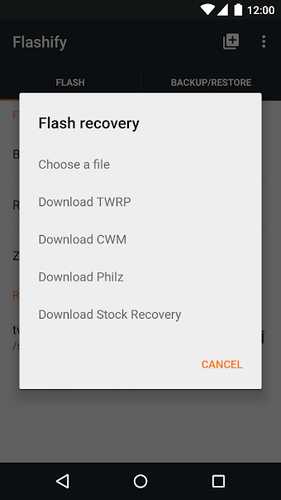
The application also allows you to patch the operating system and quickly restore the device if any modification causes operational problems, which is essential for those who constantly test different ROMs.
Requirements and considerations for use
To use Flashify, you must be a root user . Without this permission, you will not be able to manipulate or install system files such as ROMs, recoveries, or kernels. Furthermore:
- It's compatible with Android 4.0 or higher.
- It does not require a PC, as all functions are run directly from the phone.
- Free mode has a limit of three flashes a dayIf you're an advanced user who needs to perform more actions per day, you can upgrade to the premium version to remove this limitation.
- You can flash both custom and some stock recoveries, although custom recoveries offer the greatest flexibility.

Advantages of changing ROM with Flashify and why you should do it
Installing new ROMs or kernels provides customization, optimization, and additional features not available on stock Android. With root access and modified ROMs, you can:
- Remove preinstalled apps (bloatware) that you don't use and that usually come from the factory.
- Update your device to versions of Android that are no longer officially supported.
- Customize the look, performance, and range to suit you.
- Enjoy tweaks, security enhancements, and exclusive features available in select ROMs and recoveries.
The process, however, must be carried out with caution and using reliable tools. That's why Flashify includes so many backup and restore features, minimizing risks and facilitating safe experimentation for those looking to get the most out of their mobile device.
There's no need to search for Flashify APKs from external sources or expose yourself to security risks. The best way to download it is through the Google Play Store . This ensures you have the most up-to-date, virus-free version.


Furthermore, the app has regular updates and support for new devices and recoveries, which keeps it as one of the best options for Android modding enthusiasts.
If you've already used Flashify to modify your device, we encourage you to share your experience, questions, and tips in the comments section. This way, you'll help other users looking to upgrade ROMs easily and safely. Always remember to back up your data before making any major changes to your Android and enjoy all the possibilities offered by the custom ROM ecosystem thanks to Flashify's advanced tools.
Table of Contents