

Many people struggle with sleep disorders and difficulty falling asleep . In the search for an effective and personalized solution, smartphones have become an unexpected ally. Among the wide variety of apps available to optimize sleep, Sleep as Android stands out thanks to its advanced features, integrations, and comprehensive analysis. Below, you'll discover how it can help improve your sleep quality and what sets it apart from other apps, with in-depth explanations of every detail and relevant recommendations.
How does Sleep as Android help improve sleep quality?

Sleep as Android is a comprehensive system for monitoring, analyzing, and improving sleep, combining smart features with an intuitive interface. It's not just an advanced alarm clock; it also uses artificial intelligence and sensor technology from the device itself (and compatible accessories) to offer solutions tailored to each user's needs.
The value proposition of this app goes far beyond a simple alarm. It relies on algorithms scientifically validated for over a decade and an active community that contributes to its constant improvement, positioning it as a benchmark within its category.

Smart alarm clock: optimal sleep cycle and personalized alarms
When it comes to improving sleep quality, the timing and manner in which we wake up is crucial. Sleep as Android includes a smart alarm clock that detects the lightest sleep phase within a defined window. This means the alarm will sound at the moment when it feels most natural and easy for you to wake up, minimizing the discomfort typically associated with abrupt awakenings during deep sleep.
Among its main features, the app allows you to choose relaxing sounds for your alarms, such as birdsong, ocean waves, thunderstorms, or soft melodies. You can also use Spotify playlists or your favorite music, as well as create volume gradients, which avoids the typical startle of traditional alarms.
For those who have difficulty getting up, Sleep as Android implements interactive challenges before turning off the alarm , including:
- Solving visual or mathematical captchas
- Scan a QR code previously placed elsewhere in the house
- Writing in a journal or counting virtual sheep
- Shake your phone or even activate the camera to smile and unlock the alarm.
These options prevent you from unconsciously turning off your alarm and falling back asleep, helping you build consistent habits and avoiding the dreaded repeated snoozing.

Monitoring sleep cycles: deep, light, and REM
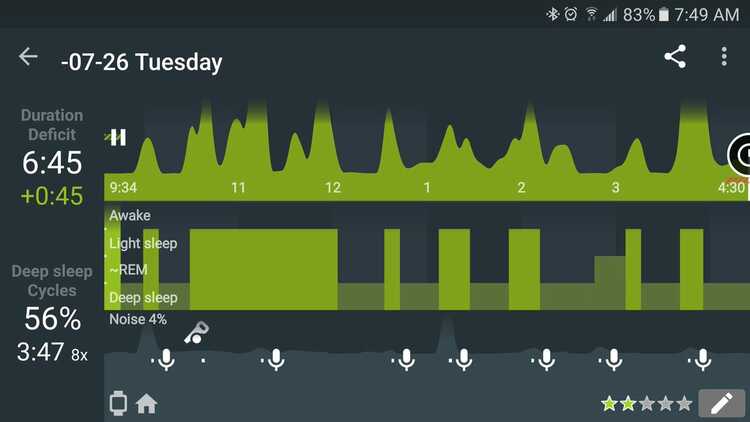
One of Sleep as Android's most advanced features is its sleep stage monitoring system . Using the phone's motion sensors or connecting devices like smartwatches and fitness trackers (Wear OS, Garmin, Mi Band, Amazfit, and many more), the app records key parameters such as:
- total sleep duration
- Time in REM phase, light and deep sleep
- Possible night awakenings or micro-awakenings
- Heart rate, breathing patterns, and snoring rate
With the option to integrate ultrasound sounding , Sleep as Android can monitor sleep without contact, leaving the mobile phone on the nightstand, detecting movements, breathing rhythm and possible irregularities in a completely passive way.
The analysis is complemented by intuitive graphs and trends , providing a clear view of how sleep quality evolves over days, weeks, and months. Users can consult statistics such as cumulative sleep time , regularity, efficiency (percentage of deep sleep, light sleep, etc.), and other data to guide necessary improvements.
Detection and recording of snoring, night sounds, and prevention of insomnia
Sleep as Android uses artificial intelligence to identify and record relevant nighttime sounds , such as snoring, sleep talking, or sounds potentially associated with insomnia. Selective recording allows only the most important fragments to be stored, helping to identify abnormal patterns and detect potential problems like sleep apnea.
In addition, it incorporates an anti-snoring function that, upon detecting this sound, can emit a vibration or a slight click to alert the user and reduce the episode without interrupting the sleep of the rest of the family.
These recordings are accessible every morning, offering the ability to play back the audio recordings, analyze them, and, if necessary, share them with a sleep medicine specialist for a professional diagnosis.

Relaxation and sleep aids: personalized sounds and melodies
For those who have difficulty falling asleep, the app offers a wide library of relaxing sounds and lullabies . Users can configure melodies, white noise, nature sounds, or upload custom playlists, which will automatically fade out when the app detects that the user has fallen asleep (the "Sleep Music Fade-out" feature).
The goal is to help combat episodes of insomnia and facilitate the transition to deep sleep, using scientifically validated auditory techniques such as the use of binaural beats to induce a greater degree of brain relaxation.
Bedtime alarms and nap timers
Controlling your circadian rhythm is key to maintaining healthy sleep habits. Sleep as Android helps define an optimal sleep window by sending notifications that alert you when it's the best time to go to bed. This feature is especially useful for those who experience sleep disruptions due to excessive phone use or poor sleep hygiene.
The app also includes timers to control the duration of naps , preventing you from waking up in the middle of a deep sleep phase and thus facilitating a faster recovery and more energy during the day. You can schedule energizing naps or customize them according to your individual sleep stages.
Advanced integrations and compatibility with wearables and smart devices

Sleep as Android stands out for its broad compatibility with wearables and digital health services . Among the most relevant integrations are:
- Smartwatches and bracelets: Pixel Watch, Wear OS, Samsung Galaxy Watch, Garmin, Amazfit, Mi Band, Zepp, Polar, Fitbit, PineTime and many others.
- Health and fitness services: Google Fit, Samsung Health, Health Connect.
- Lighting and home automation: integration with Philips HUE and IKEA TRÅDFRI to create sunrise simulations.
- Cloud storage services: sync and backup to Google Drive, Dropbox, SleepCloud.
- Automation and Notifications: IFTTT, MQTT, Tasker, Custom Webhooks.
These options allow you to take advantage of wearables' advanced sensors for even more precise monitoring and automate actions such as dimming the lights or activating "do not disturb" mode on your phone when you go to sleep.
Sleep analysis and personalized recommendations
In addition to monitoring, Sleep as Android analyzes the recorded data and calculates a "Sleep Score" that summarizes the overall quality of sleep each night. The score takes into account factors such as:
- Total duration and regularity of sleep
- Proportion of deep, light, and REM sleep
- Frequency and intensity of snoring
- Respiratory disorders detected (with compatible devices)
Based on this data, the app provides daily tips and personalized suggestions to improve your habits, from the time you should go to bed to the need to increase physical activity, ventilate the room, or avoid using screens before sleeping.
The user can add tags and notes about factors such as alcohol or caffeine consumption, stress, exercise, recent travel, etc., which helps correlate this data with changes in sleep quality.
Privacy, storage and security
A key aspect of health apps is privacy. Sleep as Android prioritizes the protection of personal data , allowing its storage locally or in encrypted cloud solutions, without sharing it with third parties without explicit consent. All sensitive information about sleep habits, sounds, and trends is accessible only to the user, guaranteeing complete confidentiality.
Home automation and additional tips for creating an optimal sleep environment
- Automate "do not disturb" mode during sleep hours to avoid interruptions from notifications.
- Use sensors or NFC tags to activate sleep mode when you leave your phone next to the bed.
- Control the room temperature with intelligent systems, keeping it between 18 and 21°C, the ideal range according to experts.
- Automate the lowering of blinds or lights as bedtime approaches to help your body relax.
- Integrate tasks such as changing sheets or airing out the room with automatic reminders to promote a proper nighttime environment.
These recommendations help transform the bedroom into a true sleep sanctuary , eliminating factors that may disrupt rest and improving the overall quality of the night.
Exclusive Sleep as Android features that make a difference
- Sleep monitoring by sonar: Exclusive technology that allows for the analysis of movements and breathing without the need for physical contact.
- Preventing Excessive Sleep: The app helps prevent both sleep deprivation and excess, both of which are harmful to health.
- Advanced protection against cheating with alarms: Uses accessibility and device management services to prevent the user from closing the app before completing the alarm challenges.
- Dream log and night diary: allows you to take quick notes of sensations, dreams or pending tasks, helping to free your mind before sleeping.
- Chronotype detection and adaptation of recommendations depending on whether you are a “lark” (more active in the morning) or an “owl” (more active at night).
Initial setup and step-by-step use to get the most out of it
- Download and install Sleep as Android from the Google Play Store.
- Set the first alarm: Choose the time, activate the smart function and choose the alarm sound.
- Activate sleep monitoring: Select whether to use the accelerometer, sonar mode, or connect your wearable for greater accuracy.
- Customize challenges when the alarm goes off: Select the ones that best suit your needs to ensure a complete awakening.
- Connecting health, music, and home automation services if you wish, for a comprehensive experience.
- Start recording dreams: Each night, start recording manually or set up automatic sleep detection.
- Review daily reports and tips: Check your Sleep Score and follow the recommendations to optimize your habits.
Setup is simple, but the depth of customization is enormous, allowing the app to be adapted to both basic and advanced users.
Frequently asked questions and recommendations for taking advantage of Sleep as Android
- Is Sleep as Android compatible with all mobile phones? It works on most Android devices, although some advanced features like sonar require compatible hardware.
- Is a wearable necessary? No, but they add precision and monitoring of additional variables such as heart rate.
- How long is the free trial? The premium trial period is usually between 5 and 15 days, after which you can use the basic version or purchase the full version with a one-time payment.
- Does the app replace a medical diagnosis? No, Sleep as Android helps improve sleep quality and detect patterns, but it should not replace professional advice in cases of serious disorders.
Additional tips to improve sleep quality using Sleep as Android
- Avoid bright screens (phone, tablet, computer) at least 30-60 minutes before bed. Use night mode or blue light filters if you must use your phone.
- Try to maintain regular sleep and wake schedules.
- Increase your daily physical activity, but avoid intense exercise before bedtime.
- Properly ventilates and darkens the room, maintaining a cool and quiet environment.
- Keep a sleep diary using the app's tracking features to identify which habits negatively affect your rest.
Thanks to its combination of artificial intelligence, advanced monitoring, extreme personalization, and integration with the home's digital ecosystem, Sleep as Android is one of the most comprehensive and highly recommended apps for those looking to improve their sleep night after night . If you experience difficulty falling asleep, frequent awakenings, morning fatigue, or simply want to optimize your daily performance, this app can become your best ally. Give it a try and discover the positive impact of truly restorative sleep.
Official video of the Android app
Download Sleep as Android
Sleep as Android is available for free download from the Google Play Store and includes a trial period to explore all its premium features. Once the trial ends, you can choose the free version, which, although limited, still allows you to benefit from the sleep monitor, or unlock the remaining features with a one-time payment.


Have you struggled with sleep disorders or feel like you're not getting enough rest? Have you tried Sleep for Android or other similar apps? Share your experiences or questions in the comments section and help other users make the leap toward quality rest.
Table of Contents
- 1 How does Sleep as Android help improve sleep quality?
- 2 Smart alarm clock: optimal sleep cycle and personalized alarms
- 3 Monitoring sleep cycles: deep, light, and REM
- 4 Detection and recording of snoring, night sounds, and prevention of insomnia
- 5 Relaxation and sleep aids: personalized sounds and melodies
- 6 Bedtime alarms and nap timers
- 7 Advanced integrations and compatibility with wearables and smart devices
- 8 Sleep analysis and personalized recommendations
- 9 Privacy, storage and security
- 10 Home automation and additional tips for creating an optimal sleep environment
- 11 Exclusive Sleep as Android features that make a difference
- 12 Initial setup and step-by-step use to get the most out of it
- 13 Frequently asked questions and recommendations for taking advantage of Sleep as Android
- 14 Additional tips to improve sleep quality using Sleep as Android
- 15 Download Sleep as Android