

Security when installing apps on Android is crucial to protecting your device and personal data. While the Google Play Store is the official and most secure source for downloading apps, many interesting or exclusive apps are only available as APK files outside the store. However, downloading and installing APKs from external sources carries considerable risks, such as the potential presence of malware, viruses, Trojans, and other malicious programs. To prevent these threats and verify the reliability of APK files, tools like VirusTotal become an essential resource for both advanced users and those who simply want greater peace of mind when installing apps on their Android devices.
In this article, you'll discover how to use VirusTotal to analyze APKs , learn all about how it works, understand how to interpret its results, and explore other essential security recommendations to avoid infections and protect your device. We'll also include key information on alternative methods and frequently asked questions, giving you a comprehensive guide to verifying the safety of any APK before installing it.
Why is it important to verify the security of APK files on Android?
Before delving into the use of VirusTotal, it's essential to understand why verifying APK files is so important. APK (Android Application Package) files are the standard format for installing applications on Android from outside the Google Play Store. Downloading them from unofficial sites can expose your device to threats, as many of these sources lack comprehensive security controls. Often, APKs can be modified to include malware, spyware, adware, or Trojans that can compromise your personal information, disrupt your phone's functionality, and even be used for espionage or credential theft.
Among the most common threats that can be hidden in an APK are:
- Viruses and Trojans: They can take control of your device, steal information, or slow down your system.
- Spyware and adware: track your activity, display intrusive advertising, or steal personal data.
- Ransomware: blocks access to your device or files until you pay a ransom.
- Rootkits and keyloggers: They allow remote access or keystroke capture, making it easier to steal passwords.
Therefore, verifying each APK before installing it is a fundamental step in protecting your Android device, even if it comes from supposedly trusted repositories.

VirusTotal: The essential tool for analyzing APKs on Android
VirusTotal has established itself as the most reliable solution for analyzing APK files (and any other type of file or URL) for threats. Owned by Google, this platform leverages the collaboration of over 70 antivirus engines and security detection systems to scan and evaluate files in seconds, generating a detailed report showing whether any engine detects malicious code.
VirusTotal's key features for Android APK analysis include:
- Simultaneous scanning by multiple leading antivirus engines.
- Analysis without the need to install additional software, just your browser.
- Compatible from both mobile devices as well as from PC.
- Detailed report and visual, where you can see exactly which antivirus engines detect problems.
- Scanning capacity for files up to 650 MB, which covers most current APKs.
VirusTotal not only checks APK files, but also URLs, compressed files, and documents in various formats, thus offering a comprehensive view of digital security. It's a free tool for individual users, although advanced versions are available for businesses and cybersecurity professionals.

How to use VirusTotal to analyze APKs on your Android step by step
Using VirusTotal to scan APK files is simple and effective. One of its strengths is that it doesn't require installing any app on your phone: the entire process is done from any web browser. Follow these steps to scan an APK for viruses and malware:
- Download the APK file on your Android device or PC from the desired source. Always remember to prioritize known and trusted websites.
- Access the VirusTotal website (www.virustotal.com) from your browser.
- Select the tab "Archive".
- Upload the APK file that you wish to analyze.
- Press on "Analyze" and wait a few moments while VirusTotal performs the scan.
- Check the results report which shows you a list of all the antivirus programs and their verdict on the file.
The scan usually takes less than a minute . If the file has already been scanned by another user, VirusTotal will provide you with the most recent results, saving you time and resources. In the report, you can view the details in the "Summary" (general overview), "Detection" (threat detection), and, sometimes, "Details" (technical information) tabs.
If no antivirus software detects any threats , you can install the APK with much greater confidence, similar to downloading it from the Play Store. However, if one or more antivirus engines flag the threat, it's advisable to analyze the type of threat identified before proceeding.
What to do if VirusTotal reports a danger or risk?
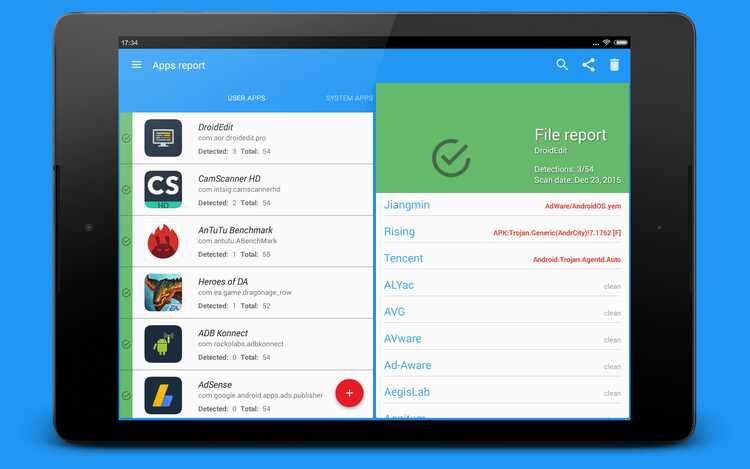
One of VirusTotal's biggest advantages is its variety of scanning engines ( more than 70, constantly updated ). However, it's possible that in some cases only one or a few engines will detect a risk, while the rest consider the file safe.
In this situation, you should take the following into account:
- If all or most antivirus programs indicate that the file is clean: It is very likely that the APK is free of threats and you can install it safely.
- If all or most detect malware: It is safest not to install the app to avoid putting your device at risk.
- If only one or a few engines detect it as malicious: It could be a false positive or a very recent or specific threat recognized by that engine. Analyze the type of threat and look for information about the specific result before making a decision.
In some cases, VirusTotal also provides links and detailed information about the nature of the detected malicious code. If the report shows red warnings, especially if they affect multiple engines, the recommendation is to avoid installing the file . If you have any doubts, you can look for opinions on security forums or consult the online community before making a decision.

Does VirusTotal replace traditional antivirus on Android?
It's important to note that VirusTotal is not a substitute for real-time antivirus software . Its primary function is to offer a second opinion and manually check files or links before running them on your device. Conventional antivirus programs, installed on your mobile device, provide constant protection, detect anomalous behavior, and automatically block threats.
Therefore, combining a reliable antivirus with regular APK scanning using VirusTotal is the safest strategy . VirusTotal is ideal for performing targeted scans on files not from the Play Store, but it doesn't replace active and up-to-date protection against real-time threats.
What other information does the VirusTotal report provide?
VirusTotal generates very detailed reports after each scan, including:
- Name and version of the antivirus engines used and update date.
- Type and description of the threats detected if any.
- Digital Hash (MD5, SHA-1, SHA-256) of the analyzed APK file, useful for verifying its integrity.
- Information about pre-detection of the file, if it has been analyzed before.
- Metadata about the file such as name, size and header.
VirusTotal's interface makes it easy to interpret all this information, presenting the positive, negative, and unknown results for each engine at a glance. If you want to dig deeper, you can also view technical details, behavioral analyses, and interactive graphs in the advanced reports.
Advantages and limitations of VirusTotal for Android users
VirusTotal stands out for:
- Free and easy access from any browser.
- Extensive support and constant updates of antivirus engines.
- Support for large file sizes for current APKs (up to 650 MB).
- No registration required for most basic analyses.
- Public reports that allow you to compare previous analyses and share results.
However, it has some limitations:
- Does not provide real-time protection, only scans files on demand.
- Uploaded files become part of the public database from VirusTotal, which means that other users can view the results (keep privacy in mind for sensitive files).
- false positives or threats not detected by all engines, especially in very recent malware.
Is there a VirusTotal mobile app for Android?
In addition to the web version, VirusTotal has unofficial mobile apps for Android that use its public API to facilitate scanning installed apps, local files, or links directly from your phone. Some of these apps, available on the Google Play Store and trusted repositories, offer features such as:
- Scan all installed apps for malware.
- Manually upload any file or URL to scan.
- Summary of results and statistics of scanned files.
- History of previous analyses.
However, keep in mind that VirusTotal itself doesn't have an official app developed by Google . All the mobile apps you find are third-party developments that use the VirusTotal API. Therefore, it's always advisable to scan the app itself before installing it and verify its legitimacy in the app store.
Other complementary tools and methods to verify APK
Although VirusTotal is the benchmark for malware scanning, there are other platforms and best practices that can complement Android app verification. These include:
- APKPure: This online tool allows you to analyze APKs and check if they are signed by the original developerUpload the file to the website and verify that the digital signature matches the legitimate developer's. A discrepancy may indicate that the APK has been modified or spoofed.
- APK ExtractorThis app allows you to extract APKs installed on your device and then analyze them on VirusTotal or similar platforms, ensuring their authenticity. You can learn more about how to do this. Extract APKs with APK Extractor.
- Digital signature verification: Comparing an APK's signature with the developer's official signature helps confirm its legitimacy. Services such as Reliable sites to download APKs They usually provide information about the digital signature and verify its authenticity.

Table of Contents
- 1 Why is it important to verify the security of APK files on Android?
- 2 VirusTotal: The essential tool for analyzing APKs on Android
- 3 How to use VirusTotal to analyze APKs on your Android step by step
- 4 What to do if VirusTotal reports a danger or risk?
- 5 Does VirusTotal replace traditional antivirus on Android?
- 6 What other information does the VirusTotal report provide?
- 7 Advantages and limitations of VirusTotal for Android users
- 8 Is there a VirusTotal mobile app for Android?
- 9 Other complementary tools and methods to verify APK